There is an important difference between a business that ranks poorly on Google Maps and one that does not appear at all, even for a search of its own exact name. The first is a competitive problem with dozens of possible contributing factors. The second is usually a specific, identifiable technical issue, a suspension, an unverified profile, a duplicate listing competing against itself, or a category mismatch quietly suppressing the listing. This guide focuses specifically on complete invisibility, not on modest ranking underperformance, because the causes and fixes are genuinely different.
If you have already confirmed your business ranks somewhere, just not as high as you would like, our broader local SEO playbook and GMB optimization guide are the better starting point. But if a direct search for your business name turns up nothing on the map at all, work through the specific causes below in order, since they are listed roughly by how frequently they turn out to be the actual explanation.
First: Confirm It Is Actually Invisible, Not Just Buried
Before assuming the worst, rule out the most mundane explanation: personalization and search history can make your own searches unreliable, especially if you or your staff have searched for or visited your own listing repeatedly, which can bias what your browser shows you. Search from an incognito window, log out of any Google account, and ideally ask someone unconnected to the business to search for you from a different device and location. A genuine invisibility problem shows up consistently across multiple independent searches, not just your own.
Search your exact business name plus your city
If searching your precise business name alongside your city still returns nothing, that is a strong signal of a real underlying issue rather than a ranking problem, since branded searches for an existing, verified listing should surface it reliably even with weak competitive rankings for generic terms.
The Most Common Reasons a Listing Disappears Entirely
An active suspension
A suspended profile is the single most common reason for complete disappearance, and it is often the least obvious to the owner, since the suspension notice can be easy to miss in an inbox full of other Google notifications. Log into your Business Profile manager directly and check for any banner or status message indicating a suspension or a policy issue requiring attention.
The profile was never verified, or verification lapsed
An unverified profile remains invisible to the public regardless of how complete the rest of the listing looks, and in rarer cases, a previously verified profile can lose that status if Google's systems flag a significant change like an address or ownership transfer that requires re-verification.
| Cause | How common it is | How to confirm it |
|---|---|---|
| Active suspension | Very common | Check for a status banner inside Business Profile manager |
| Unverified or lapsed verification | Common | Confirm verification status in account settings |
| A duplicate listing competing for the same business | Common | Search variations of your business name and address |
| A wrong or restricted category | Occasional | Review your primary category for accuracy |
| A manual action for a guideline violation | Rare but serious | Look for a specific policy violation notice |
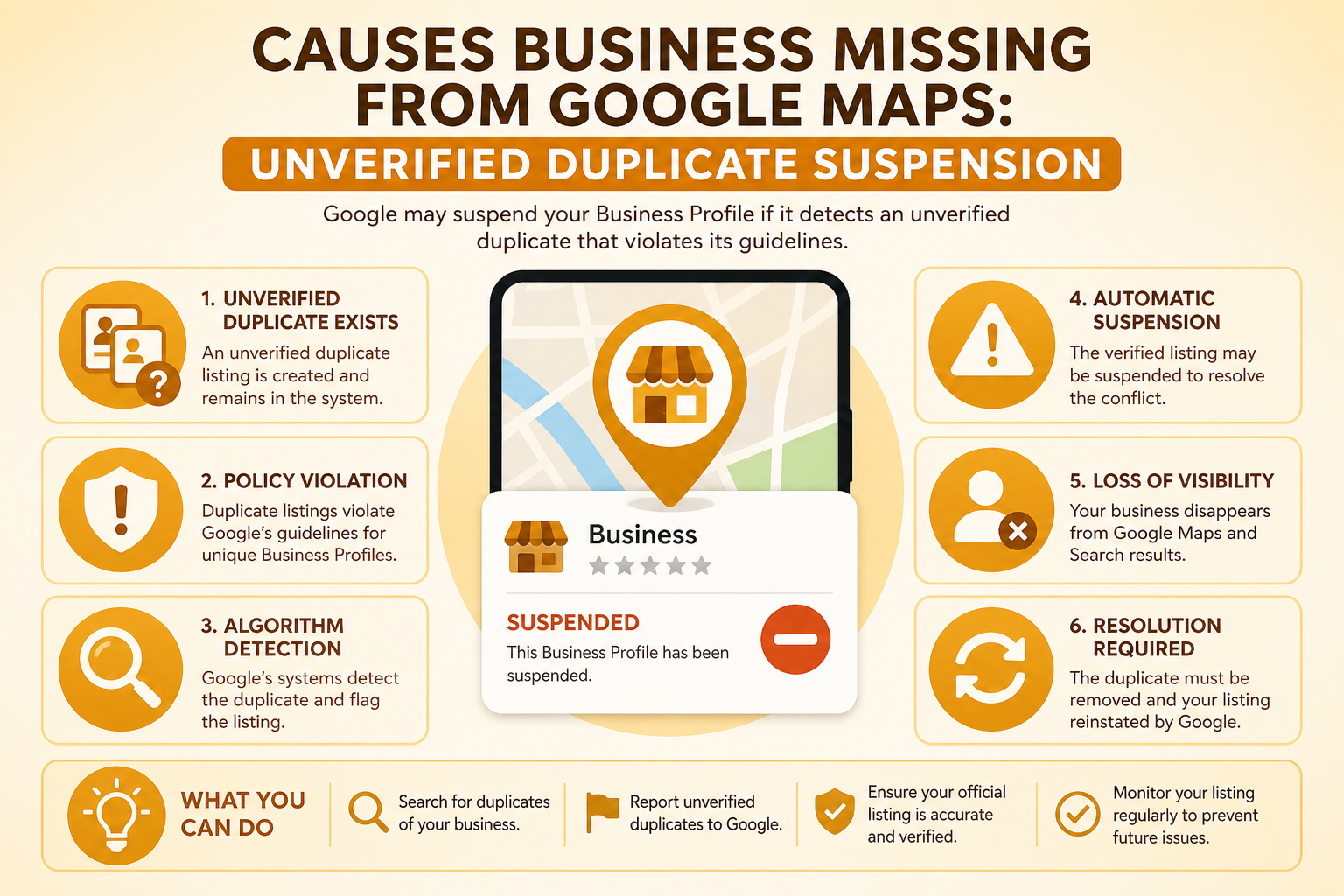
Duplicate Listings: A Frequent, Self-Inflicted Cause
Duplicate profiles are more common than most owners realize, often created accidentally, a former employee set one up years ago, a data aggregator auto-generated a listing from an old citation, or the business itself was re-created after a lost login instead of recovering the original. When two listings exist for the same business, Google's systems sometimes suppress both rather than clearly favoring one, particularly if the duplicate has slightly different details that create ambiguity about which is authoritative.
Finding duplicates requires searching your business name with slight variations, checking your address on Google Maps directly rather than through Search, and reviewing any old citations that might have auto-generated a listing you never claimed. Our guide on common GBP mistakes that hurt rankings covers the broader cleanup process, but for outright invisibility, resolving a duplicate is often the single fix that brings a listing back.
Category and Eligibility Issues
Certain categories carry stricter requirements or eligibility rules, and a mismatch can prevent a listing from appearing even when everything else looks correct. Some categories are restricted to certain regions, require additional verification steps, or are simply not supported for the business type you selected. Reviewing whether your primary category is both accurate and fully supported for your location is worth ruling out, particularly for newer or more specialized business types.
| Question | If yes | If no |
|---|---|---|
| Does an incognito search from another device also show nothing? | Likely a real issue, continue diagnosing | Likely personalization, no action needed |
| Is there a status banner in Business Profile manager? | Address the suspension or policy notice directly | Move to the next check |
| Did you make a major edit in the last two weeks? | Wait out the re-review period before escalating | Move to the next check |
| Does a duplicate listing appear for the same address? | Report or merge the duplicate | Contact support with your documentation |
Manual Actions and Serious Policy Violations
Beyond routine suspensions, Google occasionally applies a manual action for more serious guideline violations, patterns like fake reviews the business appears to have generated itself, a history of creating multiple duplicate listings to manipulate rankings, or evidence suggesting the business does not actually exist at all. Manual actions are less common than routine suspensions but tend to be more serious, since they typically indicate a specific human reviewer identified a deliberate pattern rather than an automated system flagging a technical mismatch.
If you receive a specific notice describing a policy violation rather than a generic suspension message, read it carefully rather than assuming it is a mistake. These notices, while still sometimes imprecise, usually point toward a genuine pattern the reviewer identified, and addressing that specific pattern honestly in any response gives you a far better chance than a general denial that does not engage with what was actually flagged.
What if you believe the manual action was applied in error
Mistaken manual actions do happen, particularly when a legitimate business shares characteristics with a pattern more commonly associated with abuse, a newly formed business in a category with a history of fraud, for instance. In these cases, a clear, well-documented appeal explaining your specific circumstances, backed by real evidence of your legitimate operations, is the right response rather than assuming the situation is hopeless.
It is also worth remembering that visibility problems compound the longer they go unaddressed, a listing invisible for weeks not only loses direct search traffic but also loses the reviews, calls, and engagement that would otherwise reinforce its prominence signals once restored. Treating a sudden disappearance as an urgent priority rather than something to get to eventually meaningfully shortens the total revenue impact, even though the diagnostic and appeal process itself cannot be rushed.
What To Do If Your Profile Looks Fine But Still
When none of the obvious causes apply, no suspension notice, verification confirmed, no duplicate found, category correct, the next step is Google's Business Profile support channel directly, since some suppression issues are not visible from the account side at all and require a manual look from Google's team. Document everything you have already checked before reaching out, since a specific, well-documented question gets a faster, more useful response than a vague "why can't people find me" inquiry.
It is also worth checking whether recent significant edits, a name change, address move, or category switch, happened shortly before the disappearance, since Google's systems sometimes re-review a listing after a major change, temporarily suppressing it during that process. This is different from a suspension in that it typically resolves on its own within a couple of weeks without requiring an appeal.
Preventing Future Disappearances
Once your listing is visible again, the same preventive habits that reduce suspension risk apply here: keep your business name, address, and category consistent with your legal documentation, avoid clustering several significant edits together, and periodically search your own business from an incognito window to catch a disappearance early rather than discovering it weeks later when calls have already slowed down.
Keep a simple record of your profile as a reference point
Screenshot your fully verified, visible profile occasionally, the description, categories, hours, and a sample search result showing it appearing correctly. This costs almost nothing to maintain but becomes genuinely useful evidence if a future disappearance requires you to demonstrate what the profile looked like before an issue occurred. Many owners only discover how their listing was previously configured after it has already changed or vanished, which makes any dispute or reinstatement request harder to build than it needs to be.
Frequently Asked Questions
Why can't I find my business when I search for it myself?
Personal search history and personalization can bias your own results; search from an incognito window or ask someone unconnected to the business to check independently.
Can a suspension happen without any notification?
Notifications are usually sent, but they are easy to miss among other emails, so checking your Business Profile manager directly is more reliable than relying on your inbox.
How do I know if I have a duplicate listing?
Search your business name with slight variations and check your exact address directly on Google Maps; a second listing with similar details is a strong sign of a duplicate.
Will a recent address change cause temporary disappearance?
Yes, significant edits like an address or ownership change can trigger a re-review period during which the listing may be temporarily less visible, typically resolving within a couple of weeks.
Should I create a new listing if my old one will not appear?
Only as a last resort after ruling out suspension, verification, and duplicate issues, since a new listing starts with no history and can create a duplicate problem of its own.
Does a wrong category cause complete invisibility?
It can in specific cases where the category has regional restrictions or additional requirements, though more often a wrong category causes poor relevance rather than total disappearance.
How long should I wait before contacting Google support?
If none of the common causes apply after a thorough check, reaching out within a few days is reasonable rather than waiting indefinitely for the issue to resolve itself.
Final Takeaway
Complete invisibility on Google Maps almost always traces back to one of a handful of specific, identifiable causes, a suspension, a verification issue, a duplicate, or a category problem, rather than a mysterious ranking penalty. Work through the checks in this guide systematically, starting with confirming the problem is real rather than a personalization artifact, and most cases resolve within a couple of weeks once the actual cause is identified and addressed directly.