Local SEO for a single storefront is hard enough on its own, but the moment a business opens a second, fifth, or fiftieth location, the entire discipline changes shape. You are no longer optimizing one Google Business Profile and one website, you are managing a system, and every small inconsistency you would normally catch by eye on a single listing gets silently duplicated across every location the moment it slips into a template or a bulk edit. A typo in a phone number format, a slightly wrong category, or a copy-pasted location page can quietly undermine dozens of listings at once instead of just one.
This guide is written specifically for businesses managing multiple physical or service-area locations, franchises, multi-branch service companies, regional retail chains, and healthcare groups with several clinics. It covers how to build a Google Business Profile system that scales cleanly, how to structure location pages on your website so they do not read as duplicate content, how to distribute review generation across locations without funneling problems, and the specific mistakes that show up almost exclusively at multi-location scale.
Why Multi-Location Local SEO Breaks the Single-Location Playbook
Most local SEO advice is written with a single business in mind: optimize your profile, get reviews, build citations, publish posts. That advice does not stop being true at scale, but it stops being sufficient, because the real challenge in multi-location SEO is not knowing what to do, it is doing it identically, correctly, and consistently across every single location without any of them drifting out of alignment over time as different regional managers, franchisees, or marketing staff touch their own listings.
The duplication problem
A single inconsistency in a location's name format, suite number, or phone number is a minor annoyance on one profile. The same inconsistency baked into a spreadsheet template or bulk-upload process becomes forty or four hundred inconsistencies overnight, each one a small crack in the NAP (name, address, phone) consistency that citation-based trust signals depend on. Fixing this after the fact at scale is far more expensive than building the template correctly the first time.
The cannibalization problem
When two of your own locations sit close enough together to plausibly serve the same customer, three miles apart in a dense suburb, for example: Google's systems, and the customer themselves, can struggle to tell which listing is actually the better match for a given search. This internal competition, sometimes called cannibalization, can suppress both locations' visibility rather than helping either, and it requires a deliberate strategy around service-area boundaries and content differentiation rather than simply letting every location optimize independently.
| Challenge | Single Location | Multi-Location |
|---|---|---|
| Profile setup | One-time, easy to get right by hand | Needs a repeatable, auditable template |
| NAP consistency | Easy to catch a typo | One error can replicate across dozens of listings |
| Review generation | One simple request process | Needs per-location tracking and routing |
| Content strategy | One homepage and service pages | Unique page per location without duplication |
| Internal competition | Not applicable | Nearby locations can cannibalize each other |
Building a Google Business Profile System That Actually Scales
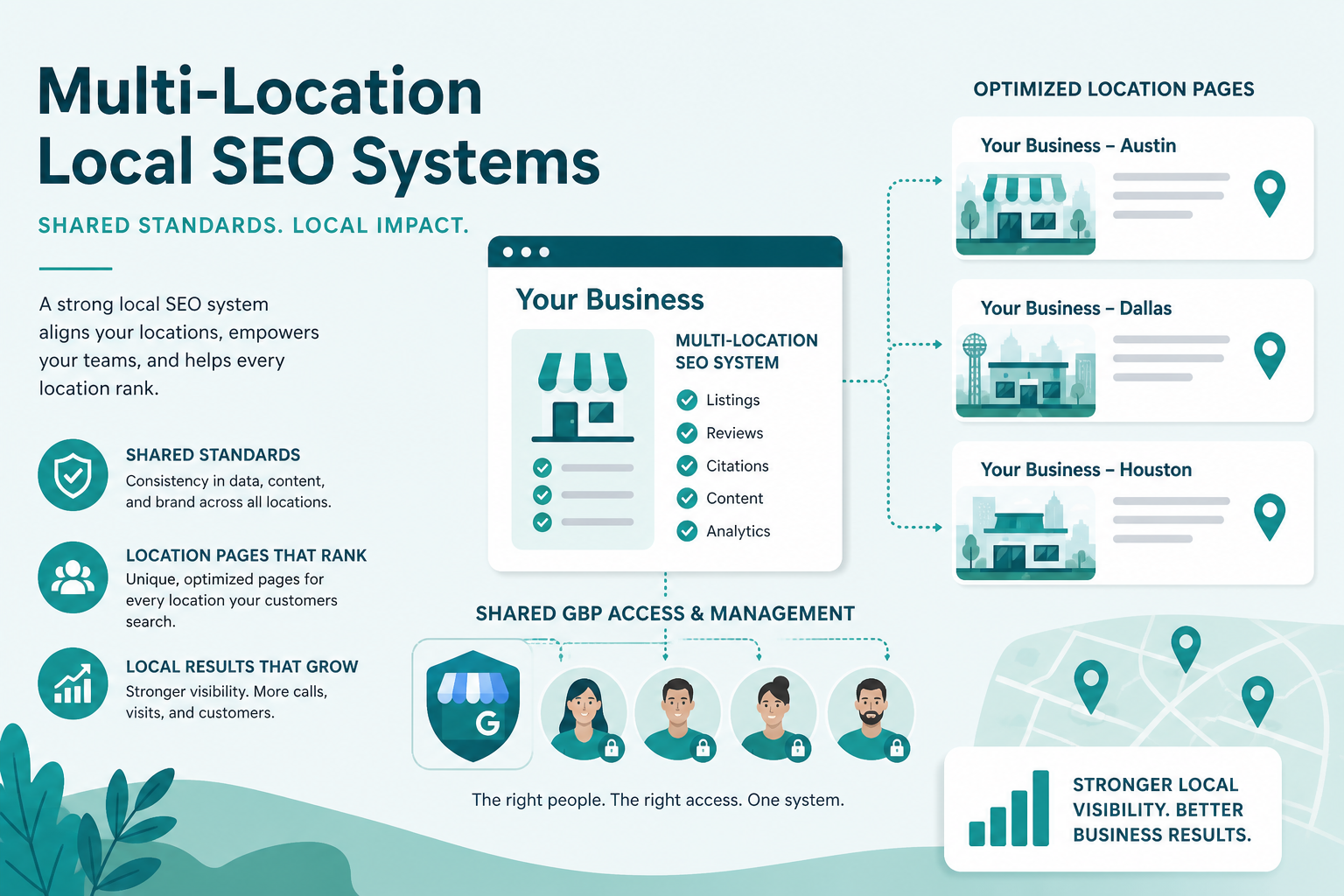
The starting point for any multi-location strategy is a single source of truth, a locked spreadsheet or, better, a dedicated location-data platform, that defines the exact, approved format for every field on every listing: business name, category selections, service list, description template, and business hours format. Every new location profile should be built directly from this template rather than recreated from memory by whoever happens to be opening that location, which is the single biggest source of drift in large location networks.
Standardize before you scale, not after
It is far cheaper to lock down naming conventions, category choices, and description structure before your fifth location opens than to retroactively clean up inconsistencies across fifty locations later. Decide early whether locations will include a neighborhood name in the display name (only where legitimately part of the registered or commonly used name, never invented for SEO), how suite numbers are formatted, and which categories genuinely apply to every location versus which vary by site.
Use location groups and clear ownership
Google Business Profile's location group and bulk management tools exist specifically for multi-location accounts, letting a central marketing team maintain oversight while granting appropriately scoped access to regional managers or franchisees for the pieces they genuinely need to control, like hours during a local event or a location-specific photo. Avoid a structure where dozens of individual personal Google accounts each manage their own listing with no central oversight, since this is exactly the setup that lets inconsistencies creep in unnoticed for months.
| Step | Action | Owner |
|---|---|---|
| 1 | Create profile from the locked template, not from scratch | Central marketing team |
| 2 | Verify address, phone, and hours against the lease | Local manager |
| 3 | Add location-specific photos within the first week | Local manager |
| 4 | Publish a unique location page on the website | Central marketing / dev team |
| 5 | Add or update location in all core citations | Central marketing team |
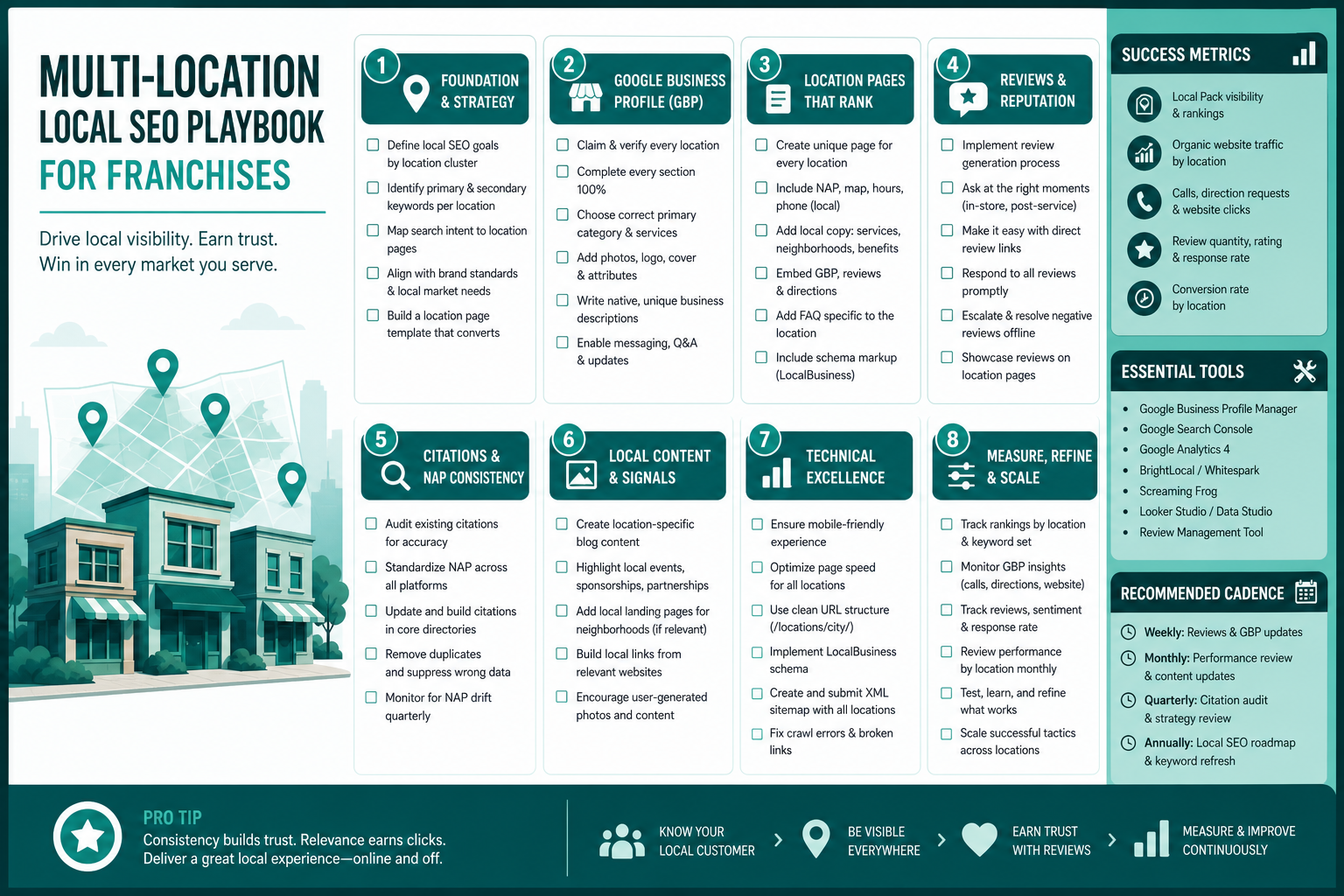
Location Pages: The Half of the Equation Your Website Owns
A Google Business Profile alone is not a complete local presence, every physical or service location also needs its own page on your website, and the biggest mistake multi-location businesses make here is templating these pages so aggressively that they become near-duplicate content with only the city name swapped out. Google can and does recognize this pattern, and thin, interchangeable location pages rarely earn meaningful organic visibility on their own, even when the corresponding Google Business Profile ranks well in Maps. Our detailed guide on optimizing location pages for local SEO covers this in more depth.
A genuinely useful location page includes real, specific detail: the team or manager at that location, parking or access notes unique to that site, service availability that might differ by branch, and an embedded map with accurate directions. This is also the natural place to link back to your Google Business Profile optimization efforts and to your core local ranking tools, giving each location a genuinely distinct footprint rather than a copy-pasted shell.
Managing Reviews and Reputation Across Every Location
Review generation has to be distributed to work at scale, a single company-wide review link does not tell Google, or the customer, which specific location the feedback relates to, and it makes it far harder to identify a struggling location before its rating drags down brand perception broadly. Each location needs its own trackable review request flow, ideally triggered by the actual staff member or manager who served that customer, which also tends to produce noticeably more detailed, specific reviews than a generic company-wide request.
Watch closely for review funneling issues at the regional or franchise level, where a location manager under pressure quietly steers dissatisfied customers away from leaving a public review while only prompting happy customers, this is against Google's guidelines, and it also hides real operational problems from leadership until they have grown much larger. A consistent, unfiltered review request process, audited centrally, protects both compliance and the accuracy of what leadership actually sees about each site.
Avoiding the Mistakes That Show Up Almost Only at Scale
Duplicate or near-duplicate listings for one physical location
It is common for a single location to accumulate two or three listings over the years, one from an old ownership change, one created accidentally by a franchisee, one duplicated during a rebrand, and each duplicate splits reviews, confuses the map, and can trigger a spam flag on the legitimate listing. A periodic audit across the entire location network to find and merge duplicates is one of the highest-leverage maintenance tasks a multi-location business can do.
Letting nearby locations compete instead of cooperate
When two locations are genuinely close enough to overlap in search results, define service-area boundaries deliberately rather than letting both target identical keywords and neighborhoods. Assign each location a primary, clearly differentiated coverage area in its content and internal linking, and resist the temptation to have every location page target the exact same head-term keyword regardless of which site actually serves that specific area best.
Letting franchise voice drift from the brand standard
In franchise and licensed-brand networks, it is common for individual locations to gradually develop their own tone in Google Business Profile posts, review responses, and photo selection, sometimes drifting far enough from brand standards that a customer visiting two locations would not immediately recognize them as the same company. A light-touch brand guide covering tone, response templates, and photo style, distinct from the rigid data template used for NAP fields, helps preserve a consistent customer experience without stripping local managers of the ability to reflect their own community.
Frequently Asked Questions
How many locations before we need a dedicated system instead of manual management?
There is no fixed number, but most businesses find manual, one-off management starts breaking down somewhere between three and ten locations, especially once more than one person is touching listings.
Should every location target the exact same keywords?
No, especially when locations are geographically close; differentiating by actual service area and genuine local detail avoids internal competition between your own listings.
Can duplicate listings for the same location hurt rankings?
Yes, duplicates split reviews and signals across multiple profiles and can also trigger spam review, so periodic audits to find and merge them are worthwhile.
Do location pages need to be completely unique, or is a template acceptable?
A consistent template is fine as a starting structure, but the actual content on each page needs genuinely unique, location-specific detail rather than only a swapped city name.
Who should own Google Business Profile access for a multi-location business?
A central marketing team should retain primary ownership through location groups, granting scoped access to regional managers for the specific fields they need to update locally.
How do we stop local managers from filtering out negative reviews?
Use a consistent, centrally audited review request process for every customer rather than leaving the decision of who gets asked entirely up to individual location staff.
Final Takeaway
Multi-location local SEO succeeds or fails on consistency and systems, not clever one-off tactics. Build a locked template before you scale, give every location its own genuine, non-duplicated page and review flow, and audit the whole network periodically for drift and duplicates rather than assuming what worked at launch is still true a year later. Paired with a solid local SEO foundation at each site, a well-run multi-location system compounds in a way a single scrappy listing never can.