Recover From a Google is one of the highest-leverage local search topics in 2026. A Google Business Profile suspension can feel like watching your entire local visibility disappear overnight, the map pin gone, the phone stops ringing, and the only message you get back is a vague notice that your profile "does not comply with Google's guidelines." For businesses that depend on local search for a meaningful share of new customers, a suspension is genuinely stressful, and the internet is full of contradictory advice about what to do next. Some of it is outdated, some of it is written by people who have never actually gone through a reinstatement, and almost none of it is honest about how long the process really takes or how often the first appeal gets rejected.
This guide walks through what actually causes suspensions in 2026, the specific steps that give a reinstatement request its best realistic chance, and how long the process genuinely takes based on patterns we have seen across real listings. There is no guaranteed fix here, because nobody outside Google can promise that, anyone who does is not being straight with you. What follows instead is the honest, methodical process that gives your business the strongest chance of getting back online, along with the mistakes that quietly extend a suspension for weeks longer than necessary.

Why Google Suspends Business Profiles in 2026
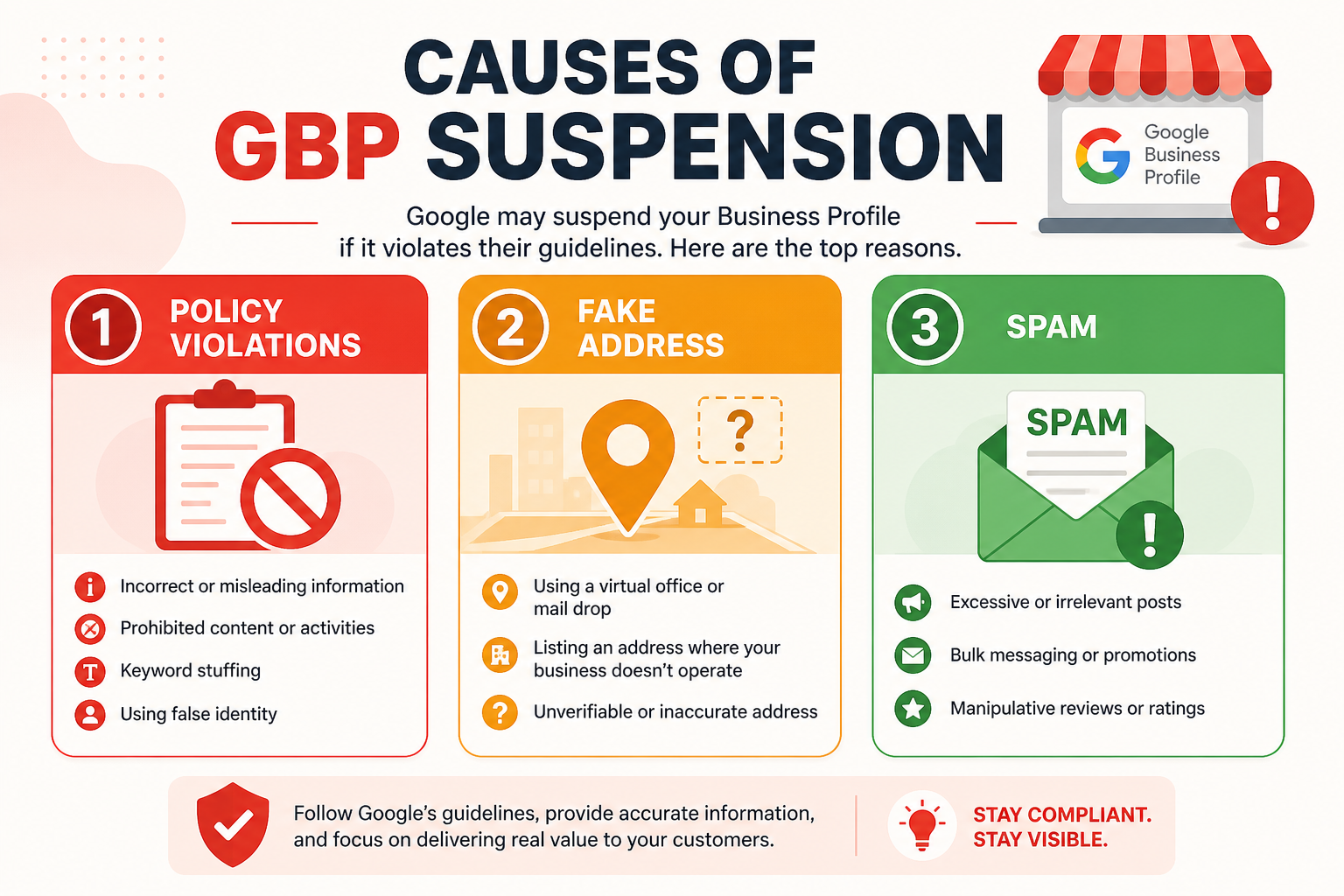
Suspensions happen when Google's automated systems or a human reviewer determine that a profile violates its guidelines for representing a business online, and the scale of local search abuse means Google leans heavily on automation to catch violations, which is exactly why so many suspensions feel disproportionate to the actual offense. A single flagged photo, an edit that changes your business name to include a keyword, or even a wave of competitor spam reports can all trigger a review that ends in suspension, regardless of whether your business is operating in good faith.
The frustrating part for most owners is that the notification rarely explains which specific guideline was triggered. You are left guessing between a dozen possible causes, which is why the diagnostic work in the next section matters more than jumping straight to an appeal. Reinstatement requests that address the wrong issue are one of the most common reasons a first appeal gets rejected.
Soft suspensions vs hard suspensions
A soft suspension typically means your profile is no longer visible in Maps or Search, but you can usually still log into your account and see the profile in the backend, often with a banner explaining that changes are under review. A hard suspension is more severe: the entire listing disappears, and you may lose the ability to log in or make edits at all. Hard suspensions are generally triggered by more serious guideline violations, such as suspected fake ownership, a fabricated address, or a pattern that looks like a keyword-stuffed business name, and they typically require a more involved reinstatement process.
The most common suspension triggers
The overwhelming majority of suspensions we see trace back to a small handful of causes: a business name that includes a service or location keyword not on the legal signage, an address that does not match a real, accessible location for a storefront category, a P.O. Box or virtual office used as a physical address, recent bulk edits made in a short window, or a spike in spam reports from competitors.
| Trigger | What it typically looks like | How avoidable it is |
|---|---|---|
| Keyword-stuffed business name | "ABC Plumbing - Emergency 24/7 Water Heater Repair" | Fully avoidable, use your exact legal or DBA name |
| Fake or virtual address | A P.O. Box or coworking space listed as a physical location | Fully avoidable, only list a real, staffed address |
| Bulk recent edits | Name, category, and address changed within days of each other | Avoidable, space out significant changes |
| Competitor spam reports | A wave of "not a real business" flags from rivals | Partly avoidable, a strong verification history helps |
| Duplicate listings | The same business listed twice under slightly different details | Fully avoidable, merge or remove duplicates proactively |
The First 24 Hours After a Suspension
The instinct for most owners is to immediately start changing things, the address, the category, the business name, hoping one of the edits fixes whatever triggered the flag. This is almost always the wrong move. Every additional edit made while a profile is under review adds another data point that a reviewer has to untangle, and in many cases it resets or extends the review clock rather than speeding anything up. The first 24 hours should be spent gathering evidence, not editing the listing.
Start by taking screenshots of your current listing details from Google Search, your business license or registration documents, recent utility bills or lease agreements showing your address, and photos of your physical signage if you operate a storefront. If you have any record of when you were last verified, note that date. This documentation is exactly what a reinstatement request needs, and having it ready before you submit anything shortens the back-and-forth significantly.
Do not panic-edit your listing
If you already made a change right before the suspension happened, a new category, an address update, a name tweak, resist the urge to immediately revert it unless you are confident it was genuinely the cause. Reverting an edit that was not the actual trigger just adds more churn to a profile already flagged for review, and reviewers are more likely to approve a request from a profile that looks stable and consistent rather than one visibly being edited mid-review.
How to Actually Get Reinstated: Step by Step
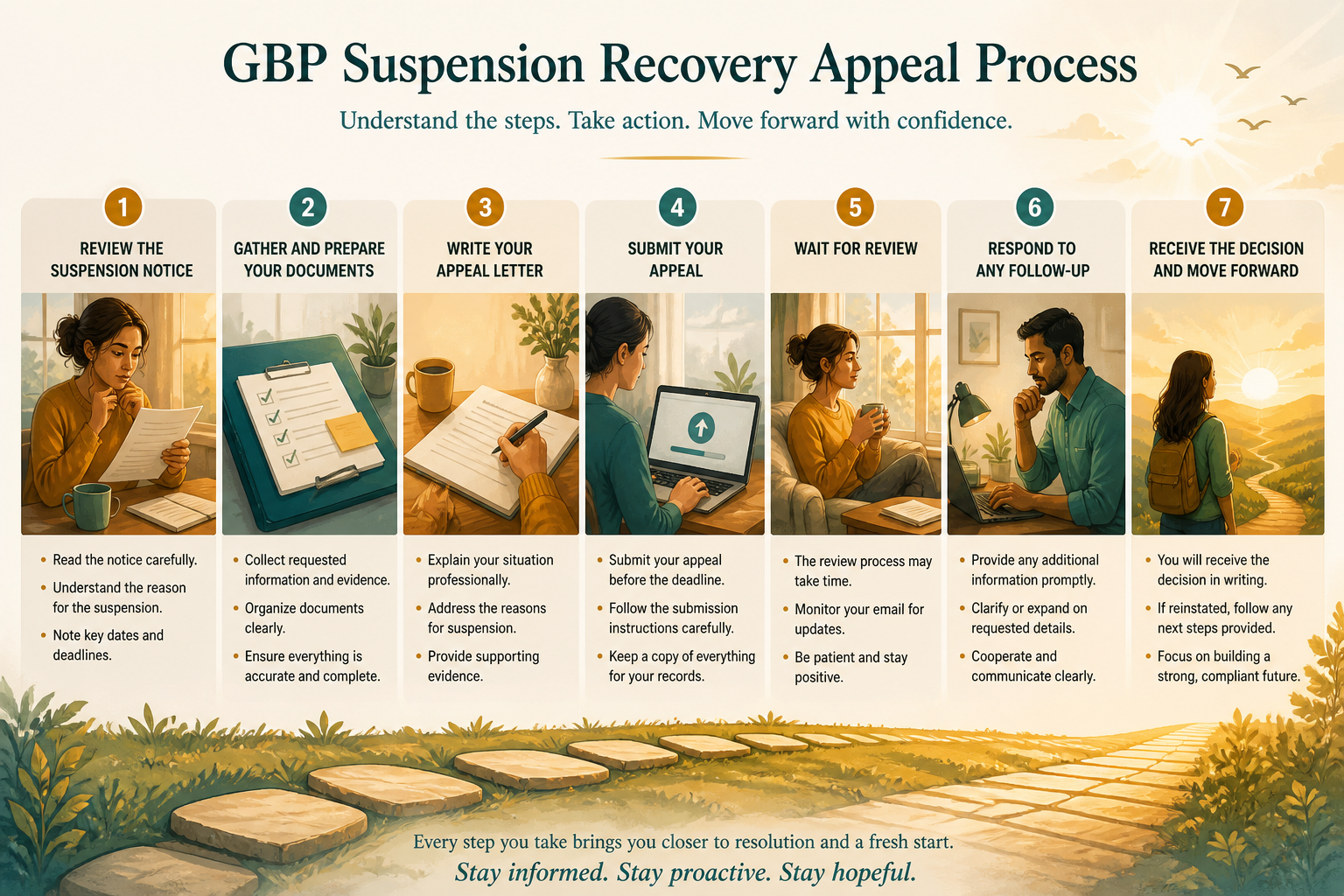
Once you have your documentation gathered, the reinstatement path runs through Google's Business Profile support channel, either via the in-product "Request review" option if your account still has access, or through the dedicated support form if you have been locked out entirely. The request typically asks for your business name, address, phone number, and a description of the issue, along with an option to attach supporting files. Keep the written explanation factual and short, a long, emotional appeal rarely helps, and a clear, evidence-backed statement of facts is what reviewers actually need to make a decision.
Filing the reinstatement request correctly
Address the specific issue you believe triggered the suspension directly rather than writing a generic appeal. If you suspect it was an address mismatch, lead with proof of your physical location. If you suspect a name violation, confirm your exact legal or registered business name and explain any discrepancy plainly. Vague appeals that say "please review my listing, I don't know what's wrong" are far more likely to get a form-letter rejection, because the reviewer has no starting point to investigate.
What to include as supporting documentation
Strong reinstatement packets typically include a business license or registration certificate, a recent utility bill or lease showing the listed address, exterior photos showing visible signage that matches the business name on the profile, and, for service-area businesses, proof of a real business address even if it is hidden from public view. The goal is to give a human reviewer enough independent verification that your business is real and operating exactly as represented, without requiring them to take your word for it.
| Step | Action | Why it matters |
|---|---|---|
| 1 | Gather a business license, lease, or utility bill | Proves a real, current address |
| 2 | Photograph exterior signage matching the listed name | Confirms the business operates as represented |
| 3 | Write a short, factual explanation of the issue | Gives the reviewer a clear starting point |
| 4 | Attach all documents in the review request form | Avoids a second round-trip for missing evidence |
| 5 | Avoid further edits while the request is pending | Prevents resetting or confusing the review |
How Long Reinstatement Actually Takes
There is no fixed timeline Google publishes, and it would be dishonest to promise one. In practice, straightforward cases with clean documentation are often resolved within one to two weeks, while more complex cases, particularly hard suspensions involving suspected fake ownership or address fraud, can take several weeks and sometimes more than one submission before they are resolved. Silence for the first several days after submitting is normal and does not necessarily mean the request was rejected; it usually means it is still sitting in a review queue.
If several weeks pass with no response at all, resubmitting with the exact same documentation rarely helps. Instead, look for any additional evidence you can add, and consider whether your original explanation may have been too vague to give the reviewer a clear path to approval. Multiple rejections often trace back to an appeal that never actually addressed the root cause, which is why the diagnostic work earlier in this guide matters as much as the paperwork itself.
Preventing a Repeat Suspension
Once reinstated, resist the temptation to immediately make several changes to "fix" other things on the profile. Space out edits over weeks rather than days, and keep your business name, address, and category exactly consistent with your legal documentation going forward. A profile that gets suspended once is statistically more likely to be flagged again if its details keep changing, simply because each edit re-enters a review pipeline that is already primed to look closely at your listing. Many of the same issues covered in our guide to common GBP mistakes that hurt rankings are also frequent suspension triggers, so addressing them serves double duty.
It is also worth auditing your Google Business Profile setup more broadly once you are back online, since a suspension is often a symptom of a deeper inconsistency, a mismatched address on a third-party directory, an old DBA name still circulating, or a category that never quite matched the business. Fixing those root causes does more to prevent a repeat suspension than any single defensive tactic ever will.
When to Consider Starting Fresh
In rare cases, typically after multiple rejected reinstatement requests over several months with no clear path forward, it can make more sense to create a new, fully compliant profile rather than continuing to appeal an old one, particularly if the original listing has accumulated a long history of edits and flags. This should be a last resort, since a new profile starts with zero review history and no accumulated prominence signals, but it is sometimes genuinely faster than an indefinite appeal cycle on a listing Google's systems have flagged repeatedly.
Frequently Asked Questions
How long does a Google Business Profile suspension typically last?
There is no fixed timeline, but straightforward cases with clean documentation are often resolved in one to two weeks, while more complex cases can take several weeks or longer.
Will editing my profile while suspended speed up reinstatement?
No, additional edits while a profile is under review usually add confusion rather than clarity, and can reset or extend the review process instead of shortening it.
Can a competitor get my Google Business Profile suspended?
Yes, a wave of spam reports from competitors can trigger a review, though Google's systems still weigh other signals, and a legitimate business with clean documentation typically survives this kind of report.
Do I need a lawyer to appeal a suspension?
No, most reinstatement requests are handled directly through Google's support channels with clear documentation, and a lawyer is rarely necessary unless the dispute involves a more serious legal question.
What happens if my reinstatement request is rejected?
You can typically submit again with additional or clearer documentation, but repeatedly resubmitting the same evidence without addressing the root cause rarely changes the outcome.
Should I create a new profile instead of appealing?
Only as a last resort after multiple rejected appeals over an extended period, since a new profile loses all review history and starts with no accumulated prominence.
Can a suspension affect my website rankings too?
Not directly, a Google Business Profile suspension affects your Maps and local pack visibility, not your organic website rankings, though the two are often optimized together.
Final Takeaway
A suspension is stressful, but it is very rarely permanent when the underlying business is legitimate and the reinstatement request is built on real, specific evidence rather than a vague appeal. Diagnose the actual trigger before you touch anything, gather documentation before you submit, and resist the urge to keep editing the listing while a request is pending. Pair the recovery process with a genuine local SEO foundation once you are back online, and a single suspension does not have to define your long-term visibility.