Open Google Maps in almost any competitive category, locksmiths, garage door repair, personal injury attorneys, addiction treatment centers, and within a handful of results you will usually find at least one listing that should not exist: a business with no real storefront, a name stuffed with services and a city it does not actually operate from, or a call center posing as a dozen different local companies across a metro area. This is Google Business Profile spam, and it is not a fringe problem. For certain lead-generation-heavy industries, spam listings can occupy a meaningful share of the map pack, crowding out real, tax-paying, locally accountable businesses that followed every rule.
The good news is that Google does provide a real reporting mechanism, and it does act on legitimate reports, even if the process is slower and less transparent than most business owners would like. This guide walks through exactly what qualifies as spam under Google's current guidelines, how to build a report that a reviewer can actually act on instead of dismissing, what realistically happens after you submit it, and how to make sure your own honest listing never gets mistaken for the thing you are trying to clean up.

What Actually Counts as Google Business Profile Spam in 2026
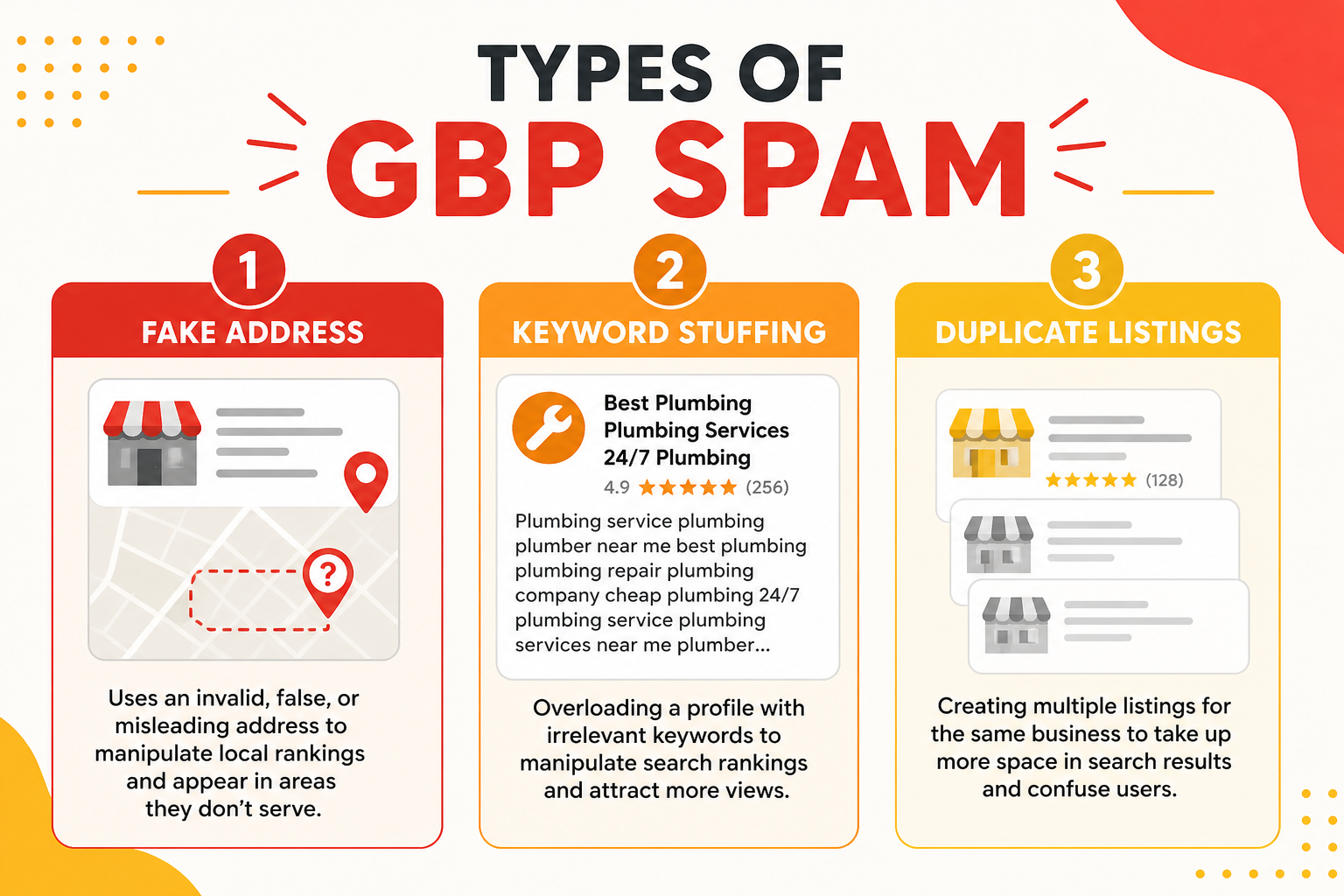
Not every listing that annoys you is technically a guideline violation, and understanding the difference matters because a report built on the wrong grounds is far more likely to be dismissed. Google's guidelines define spam narrowly: a business that misrepresents its identity, location, or eligibility to be listed at all. That includes fake businesses that do not exist, real businesses using an address they do not actually operate from, listings created for a business that has permanently closed, and profiles that use a business name containing keywords, phone numbers, or marketing language rather than a genuine trade name.
Fake or virtual addresses
The most common form of spam in service categories is a business listing a residential address, a UPS Store mailbox, or a coworking space as though it were a staffed office, purely to plant a map pin closer to a lucrative zip code. This is explicitly against Google's guidelines for service-area businesses, which are supposed to hide their address entirely rather than fake one, and it is one of the easiest violations to prove with a simple street-view check or a visit.
Keyword-stuffed and duplicate business names
The second major category is a business name edited to include a service and city, such as "Emergency Plumber Austin 24 Hour," when the actual registered name is something entirely different. Closely related is the duplicate listing problem, where the same company, or a lead-generation network posing as many different companies, creates multiple profiles for the same physical business or call center, each targeting a different neighborhood or keyword combination.
| Spam Type | What It Looks Like | Easiest Way to Verify |
|---|---|---|
| Fake or virtual address | Residential home, mailbox store, or coworking space listed as an office | Street View check or a direct visit |
| Keyword-stuffed name | Business name includes a service and city not on real signage | Compare to state business registration |
| Duplicate / multiple listings | Same phone number or address across several "different" businesses | Search the phone number in quotes on Google |
| Closed business still live | Profile remains active after the business has shut down | Check for recent reviews, hours, or a permanently-closed notice |
| Lead-generation call center | Dozens of near-identical listings sharing one call center address | Cross-reference addresses across nearby competitor listings |
How to Build a Spam Report Google Will Actually Act
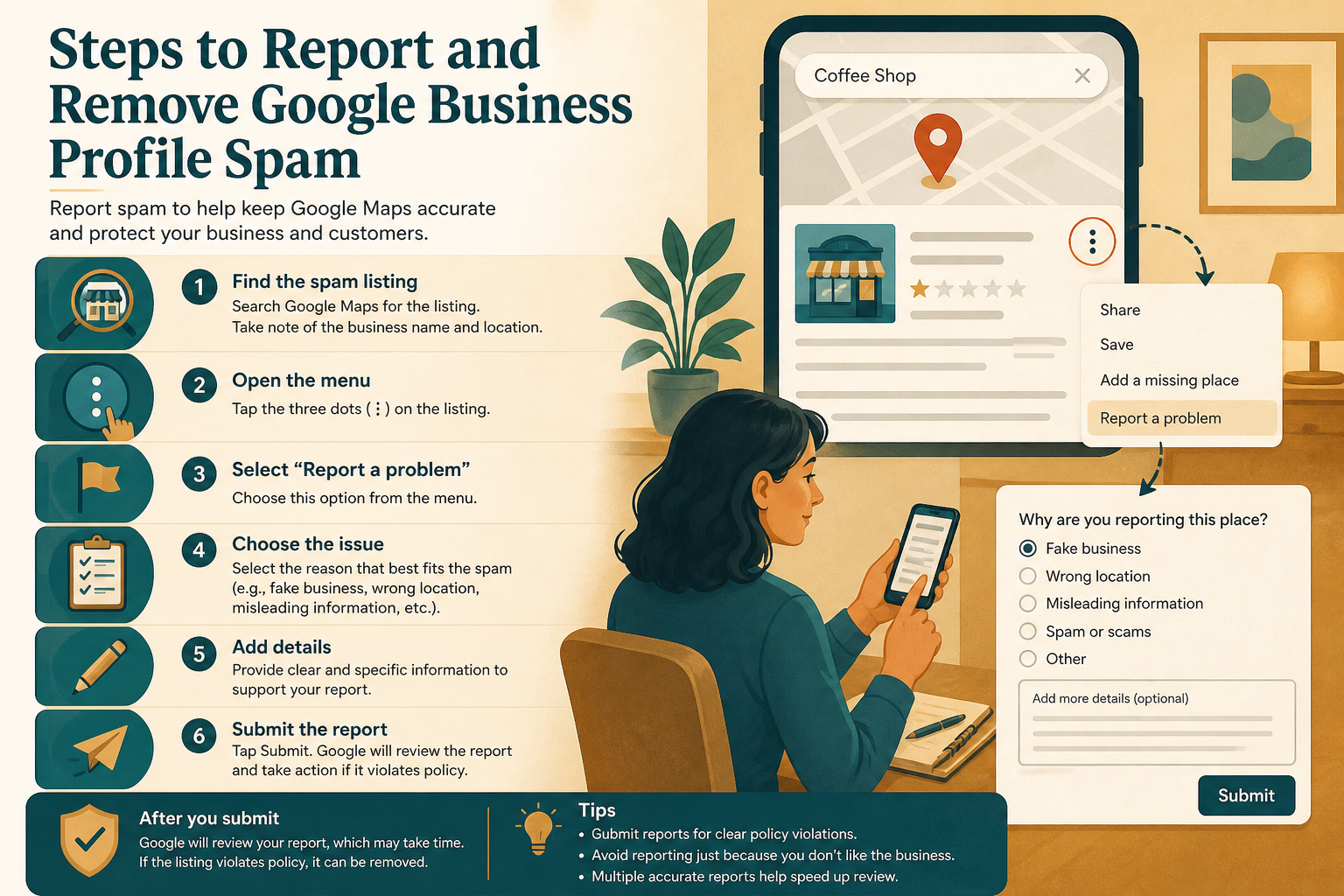
Reporting a listing starts with the "Suggest an edit" or "Report a problem" option on the profile itself, either in Google Maps or directly in Search results, but a vague report, clicking "this business is closed" without evidence, often gets auto-dismissed or ignored, because Google's systems weigh reports against the volume of similar false reports competitors file against each other. A much stronger approach documents the specific violation with evidence a reviewer can independently verify.
Evidence that actually moves a case forward
Screenshots of the business name discrepancy compared against the state business registration or licensing database, a Street View link showing no signage at the listed address, and, where relevant, a search showing the same phone number attached to multiple "different" businesses are the strongest forms of evidence. Google Maps' mobile app also lets you report directly from the pin, which some reports suggest routes through a different internal queue than the desktop web report; submitting through both when a case is serious is a reasonable, non-abusive step.
Using the Business Redressal Complaint Form
For markets where spam is severe and repeated standard reports go nowhere, Google maintains a Business Redressal Complaint Form aimed specifically at fraudulent and spam listings that have not been resolved through normal channels. This form typically asks for more detailed documentation and is reviewed by a different team, and while it is not a fast track, it exists precisely for the cases that standard reporting fails to catch. It should be reserved for genuine, well-documented cases rather than routine competitor annoyance, since abusing it can undermine your own credibility for future reports.
| Step | What to Gather | Why It Matters |
|---|---|---|
| 1 | Screenshot of the listing name, address, and phone number | Establishes exactly what is being reported |
| 2 | State business registration or licensing search results | Shows a name or entity mismatch |
| 3 | Street View link or dated photo of the address | Proves there is no real office at the pin |
| 4 | Search results linking the phone number to other listings | Demonstrates a duplicate or call-center pattern |
| 5 | A short, factual written summary (not an accusation) | Gives the reviewer a clear starting point |
What Happens After You Report: And How Long It
It would be dishonest to promise a fast or guaranteed outcome, because Google reviews spam reports at a scale most business owners never see, and a single report rarely results in immediate removal. In practice, well-documented reports on clear-cut violations, an address that obviously does not exist, a name that plainly does not match registration, are sometimes actioned within a couple of weeks, while more ambiguous cases, or spam networks that keep recreating removed listings, can take months of repeated, patient reporting before a market genuinely cleans up.
A single report from one person also tends to carry less weight than a pattern of reports from multiple, unrelated sources. If a spam listing is genuinely harming your market, it is reasonable, and not against any guideline, to make other honest local business owners in your category aware of it so they can independently verify and report it too. What does not help is coordinated mass-reporting campaigns that look automated, since Google's systems are specifically built to discount reports that look like an organized pile-on rather than genuine, independent verification.
Protecting Your Own Listing From Being Mistaken for Spam
The same scrutiny that catches genuine spam occasionally catches legitimate businesses whose profiles look unusual for reasons that have nothing to do with fraud, a new business with a shared office suite, a home-based business that recently added a small showroom, or a franchise with several nearby locations. Keeping your own profile unmistakably clean is the best protection against being flagged, whether by an automated sweep or a competitor's bad-faith report.
Keep your listing details boring and accurate
Use your exact legal or DBA business name with no added keywords, keep your address precisely matched to your lease, license, and signage, and avoid clustering several unrelated edits in a short window, since sudden bursts of changes are one of the patterns automated spam detection is built to notice. A profile that has looked stable and consistent for a long stretch of time is inherently less likely to attract scrutiny in the first place.
Build your own verification paper trail early
Keep a folder with your business license, a recent utility bill or lease showing your address, and dated exterior photos of your signage, so that if you are ever flagged, by a genuine misunderstanding or a bad-faith competitor report, you can respond immediately with proof rather than scrambling to gather it under a deadline. This is the same documentation covered in more detail in our guide to recovering from a Google Business Profile suspension, and having it ready in advance meaningfully shortens any dispute.
Monitor your own profile's edit history periodically
Google Business Profile keeps a record of recent edits, and it is worth glancing at this periodically, especially for businesses with several staff members who have editing access. An unexpected change to your business name, category, or hours that nobody on your team remembers making can be an early sign of unauthorized access or a malicious "suggest an edit" that slipped through unnoticed, and catching it quickly before it accumulates into a pattern is far easier than untangling months of drift later. This same habit also makes it easier to spot honest mistakes, like an employee accidentally adjusting hours instead of adding a holiday note.
Frequently Asked Questions
How long does it take Google to remove a reported spam listing?
There is no fixed timeline; clear-cut violations with strong evidence are sometimes actioned within a couple of weeks, while ambiguous or repeatedly recreated spam listings can take months of patient, repeated reporting.
Can I get in trouble for reporting a competitor as spam?
No, as long as your report is honest and evidence-based; Google's systems are built to discount coordinated or clearly bad-faith mass-reporting, but a single accurate report carries no penalty.
What is the Business Redressal Complaint Form for?
It is a separate channel for well-documented spam or fraud cases that standard reporting has failed to resolve, reviewed by a different team than routine "suggest an edit" reports.
Will reporting a spam listing guarantee it gets removed?
No, there are no guarantees; some reports lead to swift removal while others require multiple submissions or additional evidence before a reviewer takes action.
How can I tell if a listing is using a fake address?
A Street View check or a direct visit showing no real signage or staffed office at the pinned location is usually the clearest sign, especially combined with a name that does not match state business registration.
Can my own legitimate listing be mistaken for spam?
Yes, unusual but honest situations like shared office suites or recent address changes can occasionally draw scrutiny, which is why keeping documentation ready in advance is worthwhile.
Does reporting spam listings help my own rankings?
Not directly, but removing spam from a crowded map pack does open up genuine visibility for compliant local businesses competing for the same searches.
Final Takeaway
Spam listings are a genuine, measurable problem in local search, and cleaning them out of your market is worth the effort, but it is a patient, evidence-based process rather than a single click that fixes everything overnight. Build reports around verifiable facts, use the channels Google actually provides, including the dedicated spam detection signals Google's systems increasingly rely on, and keep your own profile scrupulously accurate so it never becomes collateral damage in someone else's cleanup effort. Combined with a genuine local SEO foundation, a spam-free map pack is one you can compete in fairly.