Every Google Business Profile owner has stared at the Performance tab's collection of graphs, wondering what any of it actually means for the business, is a spike in "discovery searches" good news, does a drop in profile views signal a real problem, and why do the numbers sometimes not match what seems to be happening in the business day to day? The data is genuinely useful, but only once you understand what each metric is actually measuring and, just as importantly, what it cannot tell you, and most owners never get a straightforward explanation of either.
This guide walks through the Performance tab (often still called Insights) metric by metric: what discovery, direct, and branded searches actually mean, how to interpret the customer actions section, the real limitations of the search queries report, and how to turn the data into decisions rather than treating it as a vanity dashboard to check occasionally without ever really acting on what it shows.
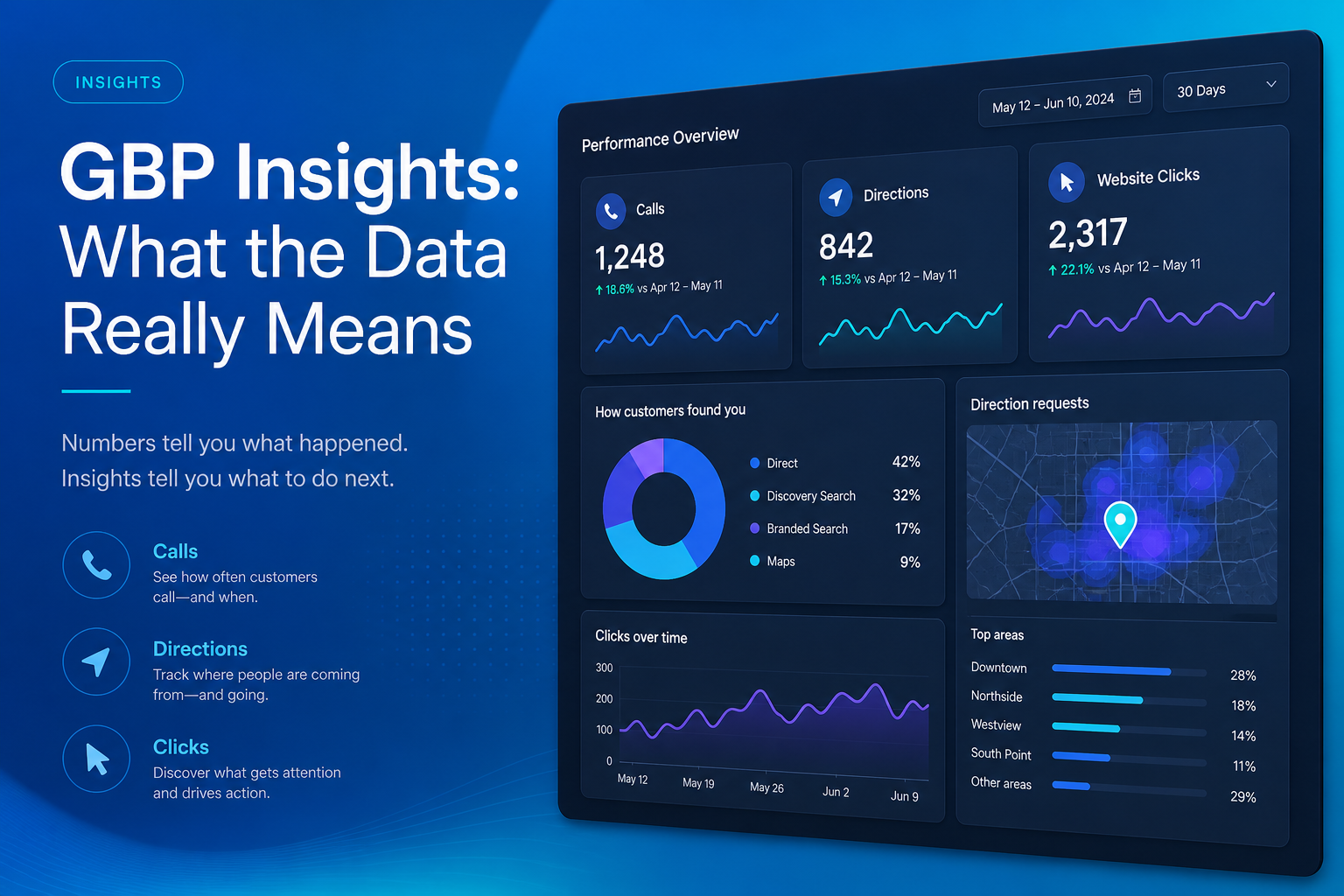
What's Actually Inside the Performance Tab
Discovery, direct, and branded searches
Google splits how customers found your profile into a small number of categories: discovery searches are generic, non-branded terms like "coffee shop near me" that surfaced your profile among competitors, direct searches are for your specific business name or address, and branded searches (in markets where Google separates this) look for a brand or service term associated specifically with you without the exact business name. A healthy profile usually shows a meaningful share of discovery traffic, since that reflects genuinely new customers finding you through relevant searches rather than people who already knew your name.
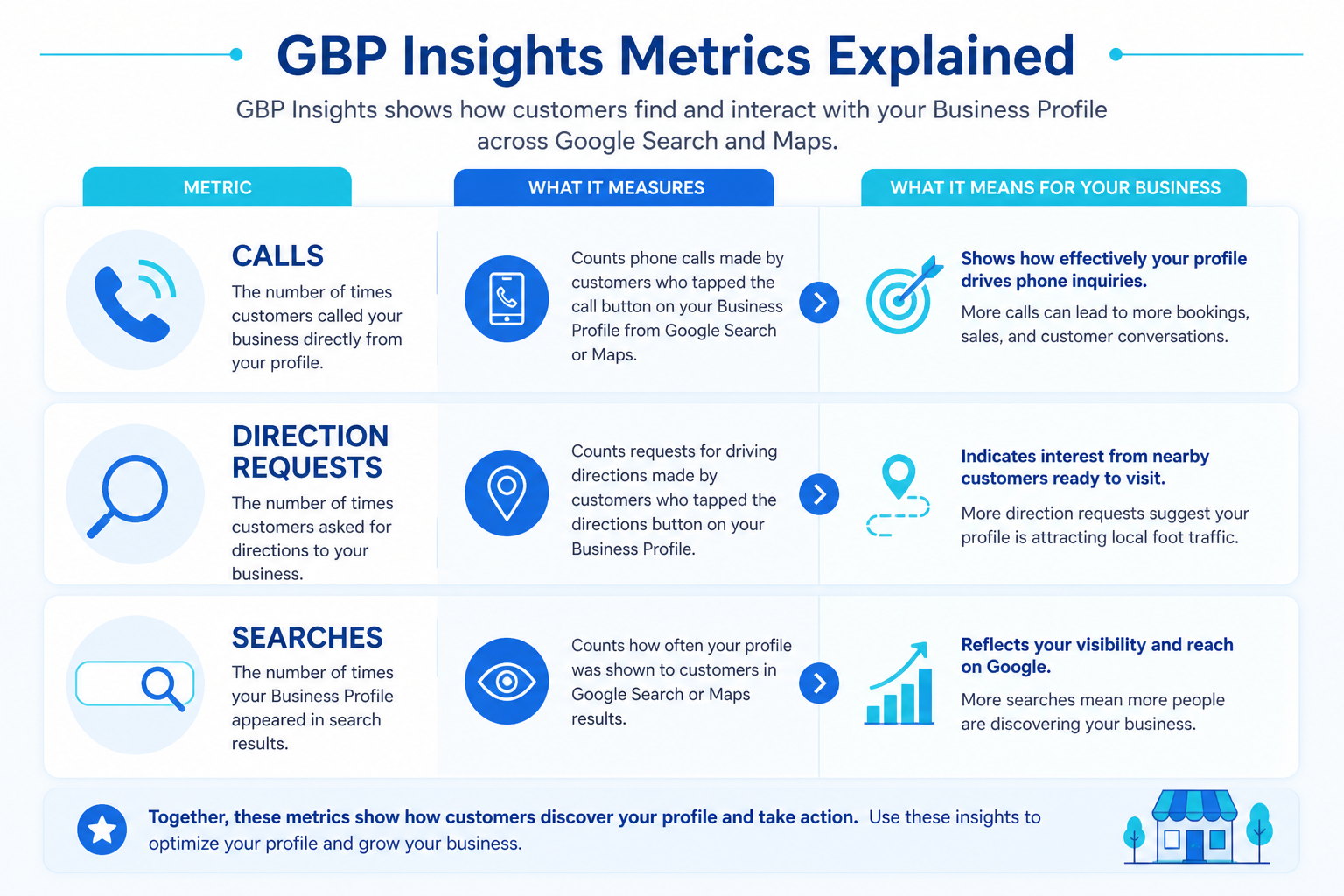
Customer actions: calls, direction requests, website visits, and bookings
The actions section tracks what people actually did after finding your profile, calling directly from the listing, requesting directions, clicking through to your website, or completing a booking through an integrated scheduling tool. This is arguably the most business-relevant section of the entire report, because impressions and searches only matter insofar as they translate into these concrete actions; a profile with high visibility but a low action rate often has a conversion problem in its photos, reviews, or description rather than a visibility problem, and treating the two as the same issue leads to fixing the wrong thing.
| Metric | What It Measures | What It Does Not Tell You |
|---|---|---|
| Discovery searches | Non-branded searches that surfaced your profile | Your exact ranking position for those searches |
| Direct searches | Searches for your specific business name | Whether those searchers are new or returning customers |
| Calls / direction requests | Concrete customer actions taken | Whether the call or visit led to a sale |
| Website clicks | Traffic sent from your profile to your site | What happened once they landed on the site |
| Photo views | How often your photos were viewed | Which specific photo drove the interest |
The Search Queries Report and Its Real Limitations
The search queries (or "how customers search for your business") report lists actual search terms that led to your profile appearing, which is genuinely useful for understanding which services or products people associate with you. It is worth being honest about its limits, though: Google aggregates and sometimes suppresses low-volume queries for privacy reasons, so the list is not a complete picture of every search that surfaced your listing, and it says nothing about your ranking position for those terms relative to competitors nearby.
Use this report directionally rather than as a precise dataset, if a search term you expect to see (a core service you offer) never appears, that is a meaningful signal your profile may not be well-optimized for that term, worth investigating through your category and services list. If an unexpected term appears frequently, it may reveal a genuine, unplanned source of demand worth leaning into with content or services. Our guide on local SEO KPIs covers how to weigh this alongside other metrics.
Photos and Engagement Metrics in Context
The photo views metric and the comparison of your photo count against similar businesses nearby give a rough sense of how your visual presence stacks up, but a high photo view count does not automatically mean those views converted into calls or visits, it simply means people looked. Use it as one input alongside the actions data rather than a standalone success metric, since a profile can have strong photo engagement and still underperform on the customer actions that actually matter to revenue.
Comparing Your Profile Against Similar Businesses Nearby
Google occasionally surfaces a rough comparison between your profile's activity, photo count, review volume, and similar nearby businesses, and while this comparison is deliberately anonymized and limited in detail, it can still be a useful sanity check on whether your profile is meaningfully behind the norm for your category and area, rather than relying purely on gut feeling about how competitive your listing looks.
What the comparison metric actually shows
The comparison typically covers a small handful of countable attributes, like total photo count or review count, benchmarked against a general category average rather than a named list of specific competitors. This gives a directional sense of whether you are meaningfully under-invested in an area, a photo count a fraction of the local average is worth addressing, without revealing exactly which competitors are ahead or by how much.
Where comparison data can mislead if taken too literally
A comparison metric says nothing about the quality of what is being counted, a competitor with more photos is not necessarily using them more effectively, and a competitor with more reviews is not necessarily earning them ethically. Use this data as a rough gauge of relative activity level, not as a precise scoreboard, and always weigh it against the more meaningful action-rate and discovery-search data covered earlier in this guide.
| Check | Question to Ask | Possible Action |
|---|---|---|
| Discovery vs. direct search ratio | Are we reaching new customers or just existing ones? | Improve category / content if discovery is low |
| Action rate relative to views | Are viewers converting into calls or visits? | Improve photos, reviews, or description |
| Search queries list | Are our core services actually showing up? | Adjust categories or services list |
| Month-over-month trend | Is performance improving, flat, or declining? | Investigate any sudden drop immediately |
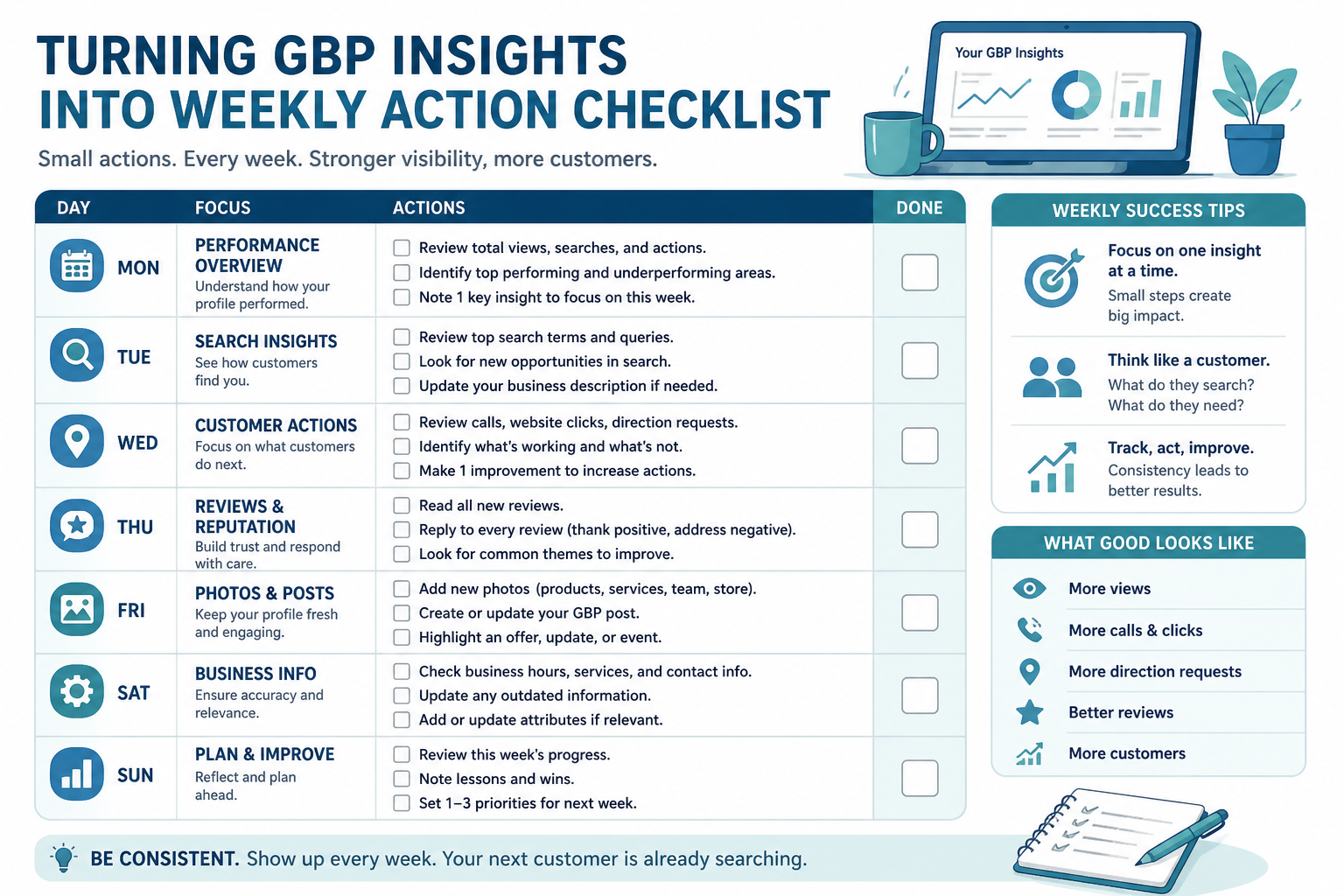
How to Actually Use Insights to Make Decisions
The mistake most businesses make with this data is checking it occasionally out of curiosity rather than reviewing it on a set cadence against specific questions. A short monthly review, comparing this month's action rate and discovery share against last month's, and against the same month a year prior if the history exists, turns a passive dashboard into an early warning system for problems and a way to validate whether recent changes to the profile actually moved the numbers. Pairing this with your broader performance tracking gives a fuller picture than the native dashboard alone.
Keep a simple running log outside the dashboard
Google's native dashboard does not retain unlimited historical data in an easily comparable format, so keeping a simple running spreadsheet, one row per month, with discovery searches, direct searches, total actions, and review count, makes year-over-year comparison far easier than relying on the built-in view alone. This log also becomes valuable context when discussing performance with a marketing partner or agency, since it shows the trend rather than a single snapshot in time.
Correlate insights data with what actually happened in the business
A dip or spike in the data means little on its own until it is cross-referenced against real events, a temporary closure, a new competitor opening nearby, a seasonal demand shift, or a recent profile edit. Businesses that keep a simple note of significant changes alongside their monthly insights log build a far more reliable picture of cause and effect over time than those trying to reconstruct the timeline from memory months later.
Share the right summary with the right audience
An owner-operator, a marketing manager, and a business partner each need a different level of detail from the same underlying data, a one-line monthly trend summary is usually enough for a partner meeting, while a marketing team benefits from the full breakdown of discovery searches, query trends, and action rates. Tailoring how the data gets communicated, rather than forwarding the raw dashboard to everyone, makes the numbers far more likely to actually inform a decision.
Frequently Asked Questions
What is the difference between discovery and direct searches?
Discovery searches are generic, non-branded terms that surfaced your profile among competitors, while direct searches are for your specific business name or address.
Is the search queries report a complete list of every search that found me?
No, Google aggregates and sometimes suppresses low-volume queries for privacy reasons, so treat the list as directional rather than exhaustive.
Does a high photo view count mean my photos are working well?
Not on its own; it indicates interest, but should be reviewed alongside your action rate (calls, directions, clicks) to see if that interest converts.
How often should I check my Google Business Profile insights?
A consistent monthly review against specific questions is more useful than occasional, unplanned glances at the dashboard.
Can insights data tell me my exact ranking position?
No, the Performance tab shows search and action volume, not your precise ranking position relative to competitors for any given term.
What should I do if discovery searches suddenly drop?
Investigate recent profile changes, check for a possible suspension or edit issue, and review whether your category and content still match what customers search for.
Can I export Google Business Profile insights data for a client or partner report?
Yes, the data can be manually recorded or exported through supported reporting tools, which is generally more useful for ongoing, cumulative tracking than relying on the native dashboard's limited historical view alone.
Final Takeaway
Google Business Profile Insights is a genuinely useful, if imperfect, window into how your listing performs, and the businesses that get real value from it are the ones that review it on a consistent schedule with specific questions in mind rather than glancing at the graphs occasionally. Treat discovery searches, action rates, and query trends as diagnostic signals that point toward specific fixes in your Google Business Profile and your broader local SEO strategy, not as a scoreboard to passively watch.