A local SEO technical audit tool helps you find website problems that can prevent search engines and customers from reaching, understanding, or using your location content. It should connect technical evidence, such as blocked URLs, broken internal links, slow templates, and invalid structured data, to local outcomes such as calls, directions, bookings, and qualified leads. The tool does not replace judgment, and an audit score does not guarantee rankings.
This guide explains how to evaluate tools and run a repeatable audit across locations. It covers the website, Google Business Profile (GBP) alignment, and reporting needed to turn findings into responsible priorities. For Maps visibility, pair this workflow with the 2026 Google Maps ranking guide.
Key Takeaways
- <strong>Start with accessibility:</strong> confirm that important location and service URLs can be crawled, rendered, indexed, and found through internal links.
- <strong>Audit local entities, not isolated pages:</strong> compare each landing page with its GBP, NAP, schema, citations, and real-world business details.
- <strong>Prioritize by impact and confidence:</strong> a broken booking path usually deserves attention before a minor metadata warning.
- <strong>Require useful evidence:</strong> a capable tool should preserve affected URLs, rule logic, crawl dates, exports, and before-and-after comparisons.
- <strong>Repeat the process:</strong> use consistent crawl settings, templates, owners, and reporting intervals so improvements and regressions are visible.
What a Local SEO Technical Audit Tool Should Do
A general crawler can inventory URLs and technical signals, but local auditing adds an entity layer. The system should associate a real location with its landing page, phone number, address, hours, GBP destination URL, schema identifier, and conversion paths. It should also distinguish genuine storefronts from service-area businesses, because the correct website and profile details differ.
Useful automation collects evidence; it should not declare every deviation an emergency. A noindex tag on an internal search page may be correct, while the same tag on a primary city page is critical. Human review remains necessary for business eligibility, search intent, content quality, accessibility, and whether a proposed change accurately reflects operations. The GBP Audit Center can help organize profile checks alongside website findings.
Tool Evaluation Criteria
- <strong>Crawl control:</strong> configurable user agents, JavaScript rendering, robots directives, sitemaps, crawl limits, authentication, and URL inclusion rules.
- <strong>Local data modeling:</strong> location-to-page mapping, NAP comparisons, GBP URL checks, multi-location segmentation, and support for service-area businesses.
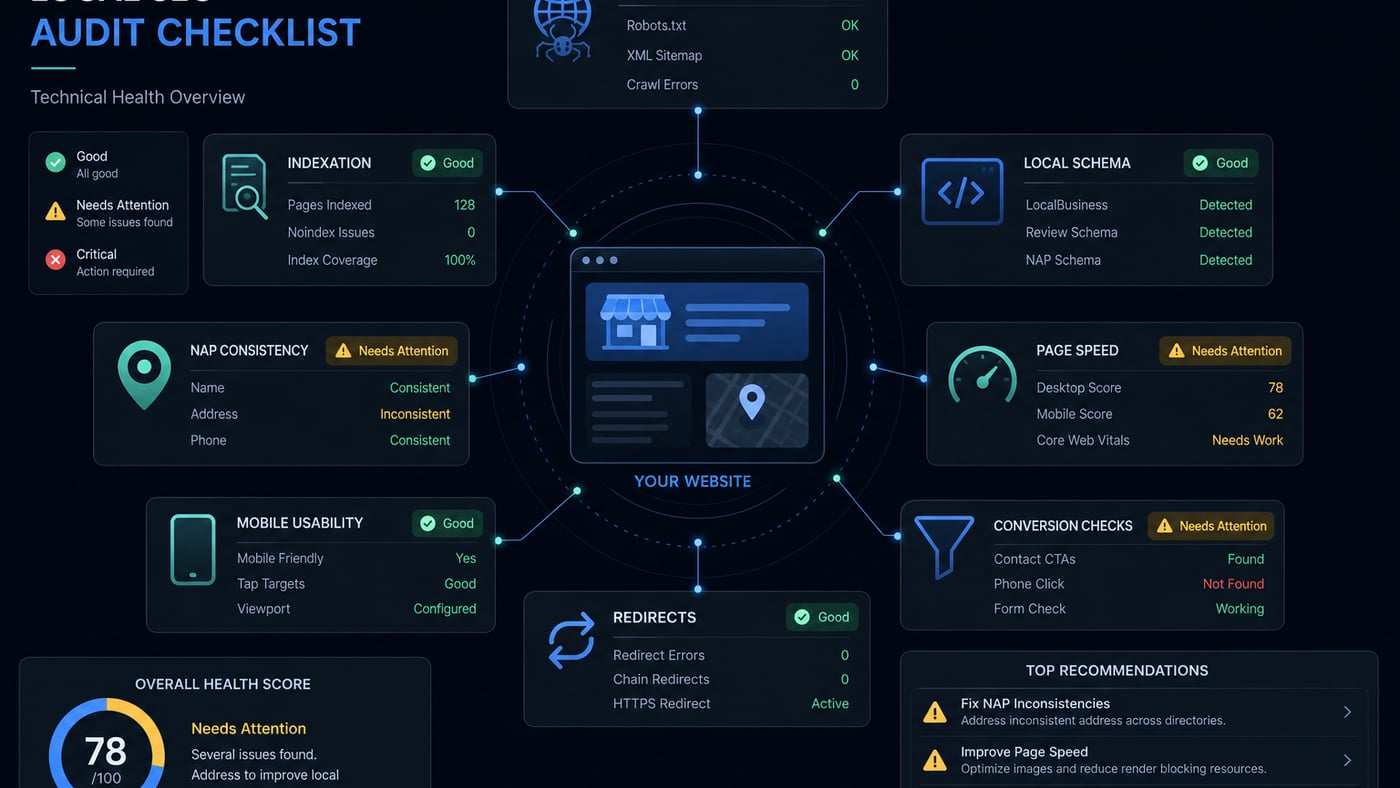
- <strong>Technical coverage:</strong> status codes, canonicals, hreflang, indexability, duplicate content, structured data, internal links, page speed, mobile checks, and accessibility signals.
- <strong>Evidence and prioritization:</strong> affected URLs, severity logic, business impact, confidence, owner, due date, and the ability to suppress accepted exceptions.
- <strong>Workflow and reporting:</strong> scheduled recrawls, change history, role-based access, exports, integrations, and clear client-ready summaries such as <a href="/products/white-label-reports" class="text-purple-400 hover:text-purple-300 underline">Local SEO Reports</a>.
- <strong>Responsible operation:</strong> transparent limits, secure handling of connected data, reasonable crawl rates, and no unsupported ranking promises.
Build a Repeatable Audit Process
1. Define Scope and Capture a Baseline
List the domains, subdomains, languages, locations, GBP profiles, templates, analytics properties, and important conversion actions in scope. Record crawl settings and save exports before changes. Capture organic landing-page traffic, Search Console indexation patterns, calls, forms, bookings, and geographically consistent rank scans where appropriate. A Local Rank Tracker can provide directional visibility context, but rankings should not be used as proof that one technical change caused an outcome.
2. Crawl, Render, and Compare Data Sources
Crawl from the homepage, XML sitemaps, known GBP landing URLs, analytics exports, and backlink lists. Compare discovered URLs with server logs and Search Console when access is available. Render JavaScript on representative templates rather than assuming raw HTML tells the full story. Segment findings by location, template, status, and indexability so a platform-wide defect is not mistaken for hundreds of unrelated errors.
3. Validate Findings Manually
Open samples on desktop and mobile, inspect rendered source, test calls and forms, and verify live GBP links. Check critical directives with more than one source where practical. Crawlers can misread blocked resources, client-side canonicals, consent behavior, or intentional regional variations. Document confirmed defects separately from warnings and questions.
4. Assign, Fix, and Recrawl
Convert confirmed findings into tickets with an owner, affected template or URL set, expected behavior, acceptance criteria, risk, and rollback plan. Test in staging when possible, then recrawl production after release. Preserve both the initial evidence and validation result. Explore broader platform capabilities on the features page, and compare workflow fit on the pricing page before choosing software.
Crawlability, Indexation, and Site Architecture
Begin with robots.txt, meta robots, X-Robots-Tag headers, authentication, firewall behavior, XML sitemaps, and status codes. Important local pages should normally return a stable 200 response, be internally linked, and avoid accidental noindex directives. Check whether JavaScript navigation hides links from the initial HTML and whether faceted URLs, search pages, print views, or tracking parameters consume crawl attention.
Architecture should let users and crawlers move logically from the main location hub to a specific location and its relevant services. Avoid orphan pages and deep, repetitive paths. Breadcrumbs, contextual links, and concise navigation can clarify relationships. Compare sitemap URLs with indexable canonical URLs; remove redirects, errors, and noncanonical duplicates from submitted sitemaps rather than treating sitemap inclusion as an indexation guarantee.
Local Landing Pages and Duplicate Content
Each legitimate location page should provide information useful for that operation: address or accurate service-area explanation, local phone, hours, services available, directions, parking or accessibility notes, staff or facility details, original images, local proof, and a clear action. A chain may share necessary brand language, but swapping only city names across otherwise identical pages creates weak experiences and can resemble doorway-page production.
Use similarity reports to locate repeated titles, headings, body sections, and metadata, then review intent, not just percentages. Consolidate pages that serve the same purpose, enrich pages representing distinct operations, and map one useful URL to each primary intent. Do not create a page for every nearby suburb unless the business can provide meaningful, truthful information for it.
NAP, Canonicals, and Hreflang
Audit name, address, and phone (NAP) across the location page, header or footer, contact page, structured data, GBP, and important directories. Formatting differences such as “Street” versus “St.” are usually less serious than conflicting phone numbers, former addresses, or mixed brand names. Track call campaigns with approved methods while retaining a consistent primary number where customers and search systems need it.
Every indexable local page should generally have a self-referencing canonical unless a deliberate consolidation strategy says otherwise. Flag canonicals that point to a national homepage, redirect, error, or unrelated city. For multilingual or multi-country equivalents, use reciprocal hreflang values and an appropriate language-region code; hreflang is not needed merely because two pages target neighboring cities in one language. Canonical and hreflang signals should agree.
LocalBusiness Schema and GBP-to-Site Alignment
Validate JSON-LD syntax, then inspect meaning. Use the most accurate LocalBusiness subtype available, a stable @id, and properties supported by visible facts. Name, URL, telephone, address, opening hours, geo coordinates, and sameAs references must describe the actual location. Do not add ratings, services, areas served, or other claims simply to make a validator look complete. Schema eligibility and appearance in search are determined by search engines, not guaranteed by passing a test.
Compare each GBP with its destination page: business identity, primary phone, address or service model, hours, categories versus represented services, appointment links, and tracking parameters. The GBP URL should resolve directly to the best matching canonical page without chains or irrelevant redirects. Check that temporary closures and special hours are reflected appropriately. GBP and website text need not be identical, but contradictions should be investigated.
Core Web Vitals, Mobile, and Accessibility
Review field data where available and lab-test representative location templates. Investigate Largest Contentful Paint, Interaction to Next Paint, and Cumulative Layout Shift at the component level. Oversized hero media, third-party maps, chat widgets, tag managers, web fonts, and location finders commonly add cost. Optimize images, reserve dimensions, reduce main-thread work, cache safely, and load nonessential embeds after intent without breaking measurement.
Test real mobile tasks: finding hours, tapping the phone number, opening directions, selecting a location, and completing a form. Check responsive layouts, viewport settings, tap targets, zoom, keyboard navigation, focus order, labels, contrast, headings, error messages, and alternative text. Automated accessibility checks are a useful filter, not a complete conformance review. Free diagnostics available through free local SEO tools can supplement, but not replace, browser and assistive-technology testing.
Redirects, 404s, and URL Hygiene
Find broken internal links, redirect chains, loops, soft 404s, malformed URLs, and mixed protocol or hostname variants. Redirect moved location pages to the closest genuine replacement only when intent matches. If a location permanently closes and no equivalent exists, an informative 404 or 410 may be more honest than sending everyone to the homepage. Update internal links, GBP destinations, sitemaps, canonicals, hreflang, and important citations after a migration.
Prioritize Findings by Business Risk
Score each issue using reach, impact, confidence, effort, and reversibility. Reach asks how many valuable locations or templates are affected. Impact considers discovery and conversion, not merely compliance. Confidence separates verified defects from hypotheses. Effort includes engineering, content, operations, and approvals. Reversibility lowers the risk of a controlled test.
- <strong>Critical:</strong> important location pages are unavailable, blocked, deindexed, hacked, or sending users to broken conversion paths.
- <strong>High:</strong> template-wide canonical errors, incorrect GBP destinations, widespread mobile failures, or materially conflicting location information.
- <strong>Medium:</strong> weak internal linking, incomplete schema, avoidable redirect chains, duplicated sections, or performance issues with credible user impact.
- <strong>Low:</strong> cosmetic metadata inconsistencies and isolated warnings that do not obstruct crawling, understanding, accessibility, or conversion.
Local SEO Technical Audit Checklist
- Confirm important pages return 200, render correctly, remain indexable, and appear in clean XML sitemaps.
- Compare crawl, sitemap, analytics, Search Console, server-log, and GBP URL inventories.
- Verify logical hubs, breadcrumbs, internal links, click depth, and the absence of valuable orphan pages.
- Review each local page for unique operational details, local intent, useful calls to action, and duplication.
- Match NAP, hours, service model, phone links, and location facts across website, schema, GBP, and key citations.
- Test canonicals, hreflang where applicable, redirects, 404 behavior, hostname rules, and URL parameters.
- Validate LocalBusiness JSON-LD syntax, properties, @id consistency, and agreement with visible content.
- Measure Core Web Vitals and test mobile conversion paths, forms, maps, calls, directions, and accessibility.
- Assign validated issues by impact, confidence, effort, owner, deadline, and acceptance criteria.
- Recrawl after deployment, annotate outcomes, report unresolved risks, and schedule the next audit.
Common Audit Mistakes
- Treating a tool score as a strategy or assuming every warning affects local visibility.
- Crawling only the sitemap and missing orphaned, redirected, parameterized, or GBP-linked URLs.
- Applying global fixes without checking location templates, languages, service-area rules, and accepted exceptions.
- Generating thin city pages or fabricated local details to increase page count.
- Marking schema valid without comparing it with visible content and real-world operations.
- Reporting hundreds of URLs instead of identifying the shared template or underlying cause.
- Changing many variables at once and then claiming one change caused ranking or lead growth.
- Finishing with a PDF instead of owners, tickets, validation criteria, and scheduled recrawls.
A Practical 30-Day Audit Plan
Days 1–7: Inventory and Baseline
Confirm access, scope, locations, templates, GBP mappings, conversion paths, and benchmarks. Run controlled crawls, collect available first-party data, and manually test representative pages. Freeze unnecessary site changes while severe access and tracking defects are assessed.
Days 8–14: Validate and Prioritize
Review crawlability, indexation, architecture, local content, NAP, canonicals, hreflang, schema, performance, mobile behavior, accessibility, and GBP alignment. Group findings by root cause, validate samples, estimate reach and effort, then agree on critical and high-priority work.
Days 15–23: Implement Controlled Fixes
Repair access, routing, conversion, and template defects first. Update internal links and location data, improve key page components, and test releases in manageable batches. Coordinate GBP, citation, content, design, and engineering changes so channels do not contradict one another.
Days 24–30: Verify and Operationalize
Recrawl affected segments, retest mobile tasks, validate structured data, and confirm analytics continuity. Document completed, deferred, and rejected recommendations with reasons. Share a concise baseline comparison, assign remaining owners, and schedule monthly monitoring plus a deeper quarterly or post-migration review according to risk.
This expanded Local SEO Technical Audit Tool: A Practical 2026 Guide resource covers structured data / LocalBusiness schema with step-by-step actions you can assign to a real owner on your team.
Businesses that treat structured data / LocalBusiness schema as a weekly operating system earn more calls than those who “set and forget” a profile.
Frequently Asked Questions
Does LocalBusiness schema guarantee rankings?
No. It clarifies your entity for search engines. Pair it with strong GBP and content.
JSON-LD or microdata?
JSON-LD is usually easiest to maintain on modern sites.
Should every page have LocalBusiness markup?
Focus on homepage and true location pages, avoid doorway spam markup.
Can fake review schema get me penalized?
Misleading structured data is risky. Only mark up eligible, accurate review data.
How do I validate schema?
Use a rich-results / schema testing tool after each major site change.
Must schema match Google Business Profile?
Yes: NAP, hours, and URLs should agree with your live listing.
Final Takeaway
Consistency compounds, spam collapses.