A local SEO keyword research tool should do more than export phrases with estimated search volume. Its real job is to help you understand what nearby customers need, how they describe that need, where they expect service, and which page or profile element should answer them. Used well, keyword research becomes a practical map connecting customer language to services, locations, content, and measurement.
This guide explains how to build that map without treating every keyword as equally valuable. You will learn what to look for in a tool, how to turn raw suggestions into a focused local strategy, and how to validate decisions with business data. If you want to work alongside the process, open the local keyword research tool and use one real service area as your test case.
Key Takeaways
- Start with services, customer problems, and genuine service areas rather than a giant list of city-modified phrases.
- Judge keywords by intent, relevance, local fit, competitive feasibility, and business value, not volume alone.
- Map each selected query cluster to one appropriate destination: a core service page, location page, supporting article, or Google Business Profile element.
- Validate keyword choices with Search Console, customer conversations, conversions, and location-specific rank tracking.
- Review the portfolio monthly because demand, competitors, offers, and the language customers use can change.
What Makes Local Keyword Research Different
Local research combines a need with geographic context. That context may be explicit, such as “estate lawyer in Bristol,” or implicit, such as “estate lawyer near me.” The same search can also produce different practical opportunities across neighborhoods because proximity, competition, and business relevance vary. A national volume estimate cannot fully represent those differences.
Local queries also span distinct moments in the buying journey. “Why is my boiler losing pressure?” is informational. “Boiler repair Manchester” signals commercial intent, while “emergency boiler repair open now” suggests urgency. All can matter, but they require different pages, calls to action, and expectations. The goal is not to repeat a city name; it is to satisfy the intent behind a locally influenced search.
How to Choose a Local SEO Keyword Research Tool
Choose a tool based on the decisions it helps you make, not the size of its database. A useful platform should reduce manual sorting, reveal patterns, preserve geographic context, and connect research to ongoing tracking. Before buying, test it with several services and locations that you already understand. If the output is mostly generic phrases, the tool will create more cleanup than insight.
Essential Selection Criteria
- Location controls that support the city, region, or country level relevant to your market.
- Seed expansion for services, problems, questions, modifiers, and closely related customer language.
- Intent and topic grouping that makes clusters easier to review without hiding the original query.
- Transparent volume, difficulty, and trend estimates with clear limitations rather than false precision.
- Competitor discovery that surfaces terms associated with relevant local businesses and pages.
- Filtering, deduplication, tagging, export, and saved lists for a repeatable team workflow.
- A practical path from discovery to tracking, reporting, and prioritization.
- Pricing that fits the number of locations, users, tracked terms, and review frequency you actually need.
Also evaluate usability. A sophisticated metric is not useful if nobody understands how it affects a decision. Review the full feature set, compare plan limits on the pricing page, and use free local SEO tools to test your process before expanding it.
A Detailed Local Keyword Research Workflow
1. Define the Business and Geographic Scope
List revenue-producing services, priority offerings, common customer problems, differentiators, and the locations you can genuinely serve. Separate physical locations from broader service areas. Then note operational constraints such as travel time, licensing, capacity, and seasonality. This prevents research from producing attractive keywords for work the business cannot profitably deliver.
2. Build Seed Topics from Real Customer Language
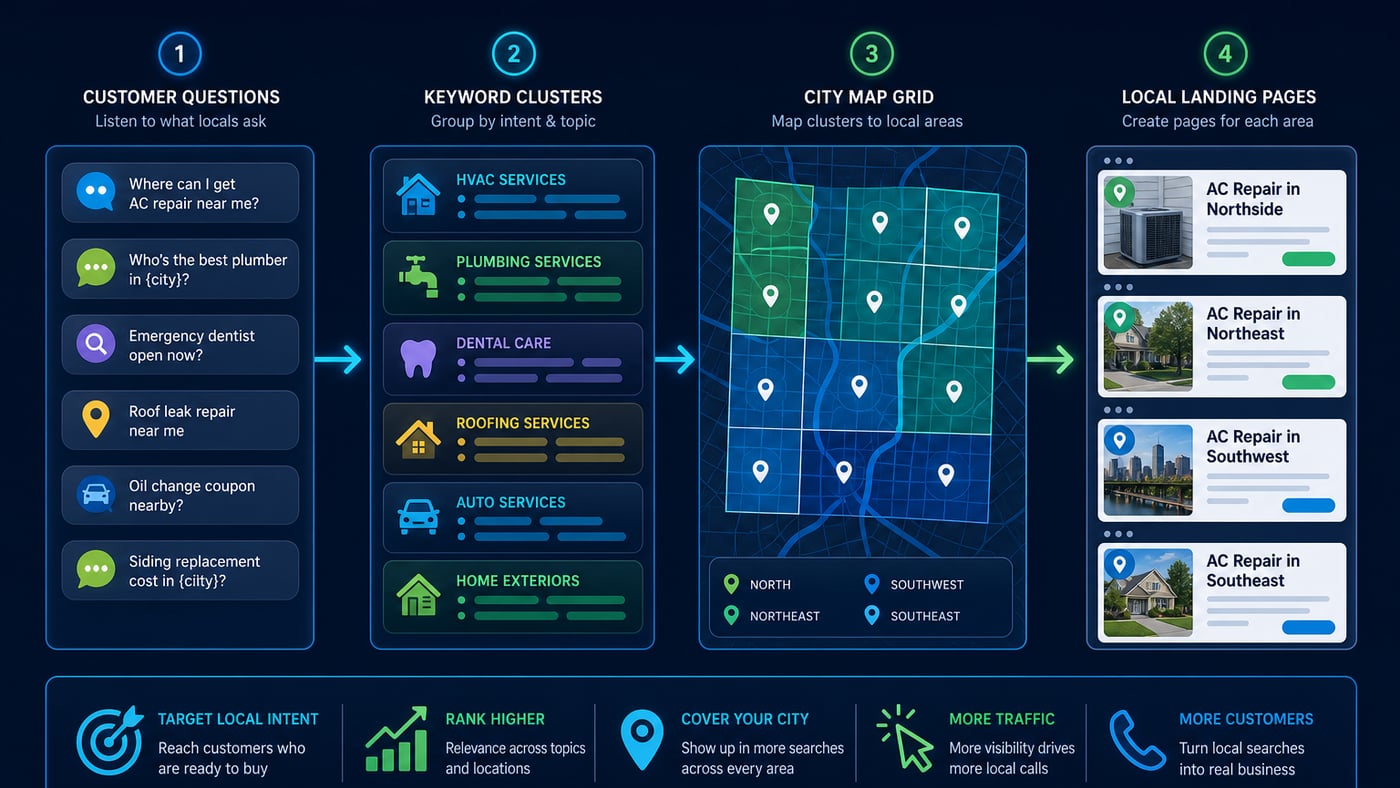
Start with service names, product categories, symptoms, urgent needs, desired outcomes, and questions heard by sales or support teams. Add language from reviews, enquiry forms, call notes, Search Console, and Google Business Profile performance data. Record synonyms without deciding too early which wording is “correct.” Customers may say “AC repair,” “air-con repair,” or “air conditioning engineer” for closely related needs.
3. Expand Service, Intent, and Location Combinations
Run seeds through the tool and combine them thoughtfully with cities, neighborhoods, counties, landmarks, and legitimate “near me” intent. Add commercial modifiers such as best, cost, quote, company, specialist, same-day, and open now only where they match the service. Include informational questions that can support a customer before the booking stage.
4. Clean and Cluster the List
Remove duplicates, irrelevant locations, unsupported services, job-seeker terms, and phrases with a meaning unrelated to the offer. Group the remainder by shared intent rather than tiny wording differences. “Divorce solicitor Leeds” and “divorce lawyer Leeds” may belong in one cluster if the same page can answer both. Keep separate clusters when the searcher expects a materially different service or outcome.
5. Review the Search Results and Local Competition
Manually inspect representative results from the target market. Note whether results favor service pages, directories, articles, maps, products, or mixed formats. Identify credible businesses that compete for the same customer, then use a competitor tracker to compare recurring topics and gaps. Competitor keywords are evidence to investigate, not instructions to copy.
6. Score and Prioritize Opportunities
Score each cluster from one to five for relevance, purchase intent, geographic fit, commercial value, and feasibility. Treat volume and trend data as directional inputs. A low-volume emergency service query can be valuable because one conversion matters, while a broad high-volume term may be too ambiguous. Document the reason for every high-priority choice so the team can revisit assumptions.
7. Map Clusters to the Right Destination
Assign one primary cluster and relevant secondary language to each page. Use core service pages for primary offerings, location pages for areas where unique local proof and information exist, and articles for questions requiring explanation. Map suitable categories, services, descriptions, and updates to the Business Profile without forcing keywords into the business name. A GBP audit can reveal profile gaps before implementation.
Examples of Turning Keywords into Decisions
Consider a dental practice. “Dentist” is broad, but clusters such as “emergency dentist,” “Invisalign consultation,” and “children’s dentist” represent different needs. Add the actual town and nearby areas, then assess whether each service is offered and whether a dedicated page would help. A question such as “what to do with a broken tooth” may support the emergency service page through a useful guide and a clear booking path.
For a home-services company, “plumber near me” may be important but difficult to interpret from a single rank check. Break research into drain cleaning, leak repair, water heater installation, and emergency callouts. Map commercially distinct clusters to service pages and track them around the real coverage area. The process creates a useful portfolio instead of one vanity keyword.
Common Keyword Research Mistakes
- Choosing keywords only by estimated volume and ignoring whether the business can serve the intent.
- Generating hundreds of city pages with near-identical content and no unique local usefulness.
- Treating every synonym as a reason to create another page, which can split relevance and confuse users.
- Copying competitor phrases without checking services, location, authority, or search-result context.
- Tracking from one device or point and assuming it represents visibility across the service area.
- Forcing exact-match phrases into headings and paragraphs until the copy becomes unnatural.
- Finishing research once and never updating it with query, conversion, or customer evidence.
Another mistake is separating research from execution. A spreadsheet has no value until it changes a page, profile, offer, or measurement plan. Keep the working list small enough to act on, and make every cluster accountable to an owner, destination, and next review date.
How to Measure Keyword Performance
Measure a chain of outcomes rather than one ranking. Start with impressions and query coverage, then review clicks, calls, direction requests, forms, bookings, qualified leads, and revenue where tracking is reliable. Segment by landing page, service, location, device, and branded versus non-branded demand. Search Console and analytics reveal site behavior, while CRM data helps distinguish activity from business value.
For map visibility, use a local rank tracker across a consistent geographic grid and schedule. Compare trends over time, not isolated snapshots, and annotate major profile, page, or offer changes. The companion guide on how to rank higher on Google Maps in 2026 explains how keyword targeting fits into a broader local strategy.
A Practical Monthly Scorecard
- Priority clusters gaining or losing qualified impressions.
- Geographic visibility changes for commercially important services.
- Landing pages earning engagement and conversions from non-branded local queries.
- Calls, forms, bookings, and qualified leads by service and location.
- New customer wording that should be added to research.
- Pages or clusters needing consolidation, improvement, or a different intent match.
A 30-Day Implementation Plan
Days 1–7: Establish the Baseline
Define services, margins, conversion priorities, and genuine coverage. Gather seeds from the website, profile, Search Console, CRM, reviews, and staff. Export current rankings and conversions. Audit existing pages so you know what can be improved before proposing new content.
Days 8–14: Research and Prioritize
Expand seeds, clean the list, classify intent, review representative results, and compare relevant competitors. Score clusters using the same criteria. Select a manageable first group: a few high-value commercial clusters plus supporting questions that directly help those customers.
Days 15–21: Map and Improve
Map clusters to existing or planned destinations. Improve titles, headings, service explanations, proof, internal links, calls to action, and local details where useful. Update accurate Business Profile fields. Create a new page only when the intent and customer need justify a distinct destination.
Days 22–30: Publish and Measure
Quality-check pages on mobile, confirm analytics and conversion events, publish approved updates, and request indexing where appropriate. Add priority clusters to location-aware tracking. Record the baseline, owners, and review date. At day 30, assess implementation quality and early signals; avoid judging the entire strategy from short-term ranking movement.
This expanded Local SEO Keyword Research Tool Guide: Find Keywords That Drive Local Leads resource covers local ads and tracking with step-by-step actions you can assign to a real owner on your team.
Final Takeaway
Local SEO Keyword Research Tool Guide: Find Keywords That Drive Local Leads is not a one-time project. Consistency compounds, spam collapses.