Google Maps competitor tracking software helps local businesses observe who appears across a market, where visibility changes, and which competitive signals deserve investigation. It replaces occasional searches from one device with repeatable evidence. Used well, it can reveal patterns in rankings, categories, reviews, content, and citations without pretending that correlation proves why Google ordered a result.
The practical objective is not to copy every visible competitor action. It is to identify credible benchmarks, understand gaps that matter to customers, and prioritize improvements you can make accurately and ethically. This guide explains how to build that process, choose software, avoid misleading comparisons, and operate a 30/60/90-day program.
What Google Maps Competitor Tracking Software Should Do
A useful platform should monitor local results from many defined coordinates, preserve historical scans, identify recurring competitors, segment keywords, and summarize visibility in a way that remains auditable. The Competitor Tracker can support this workflow, while human judgment determines whether a business is truly comparable and whether an observed change is meaningful.
Tracking should answer operational questions: Which businesses dominate the neighborhoods we serve? Are we improving for high-intent services or only broad terms? Did a competitor gain across the grid or at one pin? Are categories, review themes, landing pages, or citation accuracy plausible areas to examine? Software organizes observations; it cannot reveal Google's private weighting or guarantee future positions.
Why a Geo-Grid Is Better Than a Single Rank
Google Maps results vary by searcher location, query, time, device context, and market conditions. A rank checked at your office may look excellent while customers five miles away rarely see the profile. A geo-grid runs the same keyword from a matrix of coordinates, creating a map of local reach rather than one flattering number.
Set grid boundaries around the realistic customer area, not an arbitrary city border. Choose pin spacing that matches density: tighter in compact urban markets and wider where customers travel farther. Keep coordinates, scan frequency, and core settings consistent so periods remain comparable. The Local Rank Tracker provides the measurement layer; conversion data still determines whether visibility produces valuable calls, bookings, or visits.
Select Competitors That Create Useful Comparisons
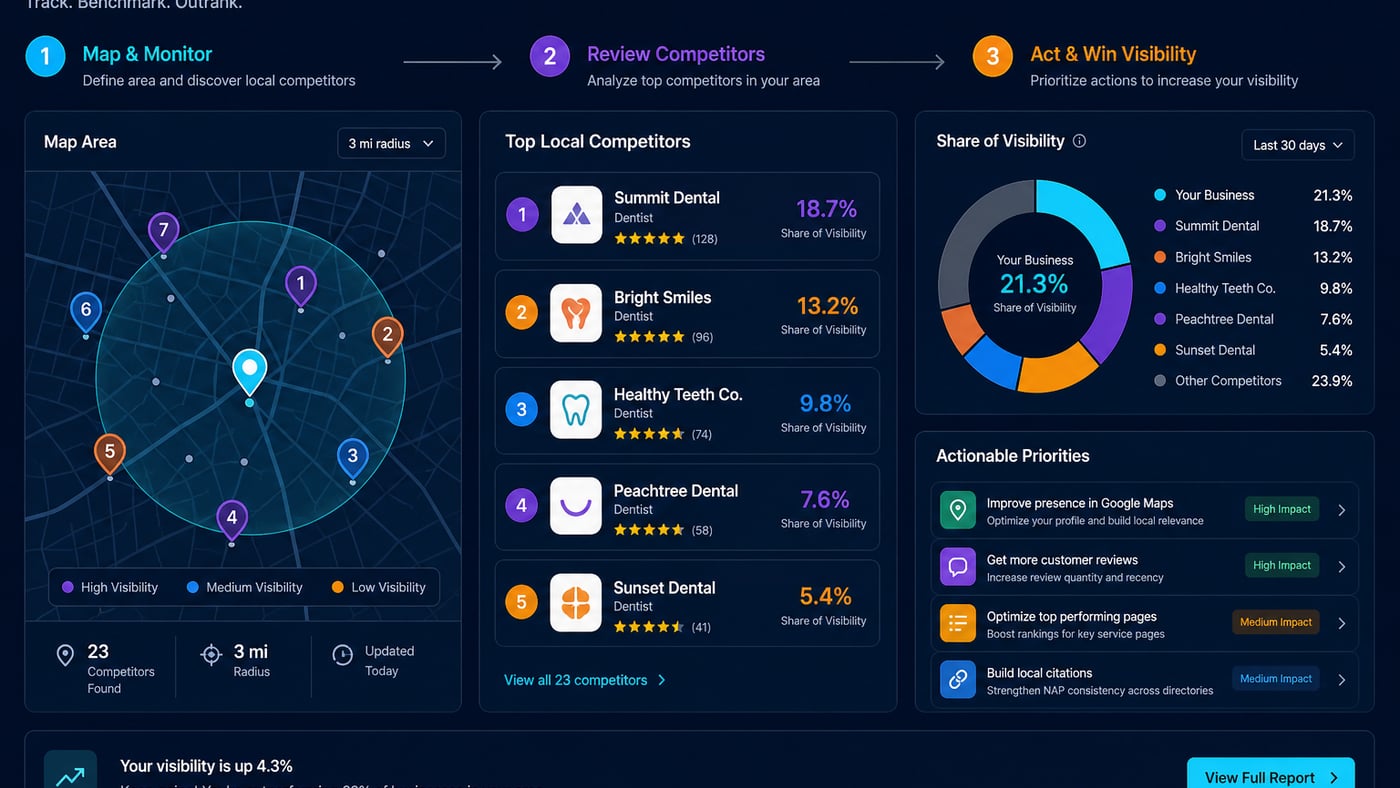
Begin with businesses that repeatedly appear for your priority services inside the target grid. Separate direct competitors from directories, aggregators, public institutions, and businesses with a different model. A national chain, a home-based specialist, and a multi-department clinic may all rank for one phrase, but their resources, eligibility, and customer proposition differ.
Maintain a primary set of three to seven close competitors and a discovery set that software updates from actual results. Record why each business belongs, its location, service overlap, apparent business model, and known anomalies. Review the set quarterly or after major market changes. Do not choose competitors merely because leadership recognizes their brand; use observed search overlap and commercial relevance.
Build Keyword Sets Around Search Intent
Organize keywords into service, problem, urgency, specialty, and location-intent groups. A dentist might separate general dentistry, emergency treatment, implants, pediatric care, and cosmetic services. Include natural variants, but avoid inflating the campaign with near-duplicates that produce the same decisions. The Keyword Research tool can help discover terms; Search Console, sales calls, forms, and staff interviews help validate their business value.
Assign each group a priority based on relevance, demand evidence, margin, capacity, and customer lifetime value. Track a stable core continuously and test secondary terms separately. Branded searches are useful for reputation and leakage monitoring, but should not be blended with non-branded discovery terms because they can make overall visibility appear stronger than it is.
Measure Share of Visibility, Not Just Average Position
Average position compresses a complex grid into one figure and can hide important differences. Pair it with top-three coverage, top-ten coverage, unranked pins, geographic reach, and share of visibility. Share of visibility estimates how much prominence each tracked business receives across the chosen pins and keywords, often weighting higher positions more strongly. Treat it as a comparative trend, not a measure of actual market share.
- <strong>Top-three coverage:</strong> percentage of measured pins where the profile appears in the local three-pack.
- <strong>Geographic reach:</strong> the shape and extent of meaningful visibility across the service area.
- <strong>Share of visibility:</strong> relative exposure within the exact tracked keyword and grid sample.
- <strong>Movement consistency:</strong> whether gains appear across many pins and scans rather than as isolated volatility.
- <strong>Business outcomes:</strong> qualified calls, forms, bookings, directions, and revenue associated with local discovery.
Annotate profile edits, website releases, review initiatives, holidays, outages, and known algorithm turbulence. Compare week over week for monitoring, but use longer windows for decisions. Rankings fluctuate naturally, and a single scan does not establish a trend.
Compare Competitive Signals Without Assuming Causation
Categories and profile positioning
Compare primary and secondary categories, services, attributes, hours, and stated positioning. Look for legitimate categories you overlooked, then confirm that each accurately represents your business before adding it. Never adopt an irrelevant category or insert keywords into a business name because a competitor does; visible spam is not a safe strategy.
Reviews and customer language
Review count and rating provide context, but velocity, recency, owner responses, service themes, and recurring complaints are more actionable. Analyze public feedback in aggregate to understand what customers value. Ask your own eligible customers for honest feedback without incentives, gating, scripts that demand keywords, or selective requests designed to suppress criticism.
Website and local content
Inspect whether competitors provide useful service pages, location details, pricing context, FAQs, proof, accessibility information, and clear conversion paths. Evaluate depth and usefulness, not raw word count. Use the findings to answer unmet customer questions with original expertise. For broader optimization context, read how to rank higher on Google Maps in 2026.
Citations, links, and local prominence
Compare presence on authoritative industry directories, chambers, associations, local media, sponsorship pages, and community resources. Correct inaccurate core listings before pursuing volume. A competitor's link does not automatically make that source worthwhile; assess relevance, editorial legitimacy, audience, and risk. Do not impersonate businesses, access private systems, scrape against terms, or use deceptive outreach.
Use Alerts to Investigate Material Changes
Configure alerts for sustained visibility shifts, new recurring competitors, category changes, unusual review velocity, profile field edits, and major grid coverage losses. Thresholds should reduce noise: require movement across multiple pins or consecutive scans before escalating. Route urgent profile-integrity alerts to an owner, and send ordinary competitive summaries weekly.
An alert begins an investigation; it does not explain the cause. Verify the live result, check whether tracking settings changed, inspect your profile and site, review seasonality and demand, and consult reputable industry reporting when broad volatility appears. Document the evidence and response so the team does not repeat speculative changes.
Choose Software Using Decision-Oriented Criteria
- <strong>Geographic control:</strong> flexible grids, coordinates, pin spacing, and support for relevant markets.
- <strong>Competitive discovery:</strong> automatic identification plus the ability to maintain curated comparison sets.
- <strong>Segmentation:</strong> filters for locations, keyword groups, devices or result types where supported, and date ranges.
- <strong>History and evidence:</strong> retained scans, clear calculation methods, annotations, exports, and reproducible reports.
- <strong>Alert quality:</strong> adjustable thresholds, sensible routing, and enough context to assess movement.
- <strong>Workflow fit:</strong> permissions, scheduling, integrations, client reporting, usability, support, and transparent pricing.
- <strong>Responsible data handling:</strong> documented privacy and security practices appropriate to your organization.
Test shortlisted tools with one location and a representative keyword set. Compare result freshness, consistency, reporting clarity, and the time required to produce a decision. Review available features and pricing against your workflow rather than buying the largest scan allowance by default.
Common Competitor Tracking Mistakes
- Checking rankings from one location and treating that result as citywide visibility.
- Tracking dozens of loosely relevant competitors until meaningful comparisons disappear.
- Changing grids, keywords, and scan schedules so historical periods are no longer comparable.
- Treating correlation as proof that a category, review, link, or content change caused movement.
- Copying competitor text, categories, locations, or review tactics without checking accuracy and policy.
- Reporting rankings without qualified leads, conversions, capacity, seasonality, or business context.
- Reacting to every scan instead of requiring sustained evidence and documenting changes.
Build Reports That Lead to Action
A useful monthly report starts with outcomes, then explains visibility. Show qualified local conversions where measurement permits, core keyword-group trends, top-three coverage, share of visibility, geographic gains or losses, recurring competitors, completed work, and next actions. Include limitations such as tracking scope, attribution gaps, and unusual market events.
Give each recommendation an owner, due date, expected customer or operational benefit, and success measure. Separate observations from hypotheses and confirmed facts. The Local SEO Reports workflow can standardize delivery, but commentary should still explain why the evidence matters.
A Practical 30/60/90-Day Competitor Tracking Process
Days 1–30: establish a reliable baseline
Define target areas, customer segments, conversion events, and keyword groups. Configure consistent geo-grids, select the initial competitor set, run baseline scans, and audit tracking accuracy. Compare categories, review themes, profile completeness, core pages, and major citations. Fix factual errors and broken conversion paths first. Create an annotation log and agree on alert thresholds before interpreting movement.
Days 31–60: implement focused improvements
Choose two or three evidence-backed priorities. Examples include correcting categories, improving a weak service page, repairing important citations, adding useful original photos, or establishing a compliant review request process. Assign owners and avoid simultaneous unrelated changes where practical. Continue scans on the same settings and record deployments, while monitoring leads and customer quality.
Days 61–90: evaluate and standardize
Compare sustained grid patterns and business outcomes with the baseline. Keep changes that improved customer usefulness or operations even if rankings remain mixed; local results may take time and are influenced by factors outside your control. Retire weak experiments, update the competitor set, refine alerts, and establish monthly reporting plus quarterly strategic reviews.
Final Takeaway
Consistency compounds, spam collapses.