A GMB health checker tool is an audit system that examines whether a local business listing is accurate, complete, trustworthy, policy-safe, and ready to convert searchers. Google renamed Google My Business (GMB) to Google Business Profile (GBP), so GBP is the current terminology. However, business owners and marketers still search for “GMB health checker tool,” which is why both terms appear in this guide.
A useful checker does more than award a flattering percentage. It should expose specific problems, explain their importance, distinguish urgent risks from optional improvements, and create a repeatable baseline. It cannot guarantee rankings, leads, or protection from every Google update. Local visibility also depends on relevance, distance, prominence, competition, website quality, and real customer demand.
What a GMB Health Checker Tool Should Measure
A complete audit combines profile data, public listing observations, website checks, reputation signals, and operational safeguards. Automated checks are efficient for missing fields and inconsistent values, while policy interpretation, category relevance, and suspicious changes often require human judgment. The best output is therefore a prioritized evidence-based checklist, not a mysterious score.
- <strong>Control:</strong> ownership, verification, manager access, and recovery readiness.
- <strong>Accuracy:</strong> business identity, contact details, hours, categories, and location settings.
- <strong>Completeness:</strong> descriptions, attributes, services, products, media, posts, and Q&A.
- <strong>Trust:</strong> review patterns, responses, duplicates, website alignment, and brand consistency.
- <strong>Safety:</strong> guideline compliance, unauthorized edits, unusual activity, and risky optimization.
- <strong>Actionability:</strong> weighted findings, evidence, owners, deadlines, and recurring monitoring.
Confirm Ownership, Verification, and Access
Start by confirming that the intended profile is verified and controlled through a company-owned Google account. The primary owner should be a durable organizational identity, not a former employee, outside agency, or personal account that may disappear. Give each authorized person individual access at the lowest suitable role, remove stale users promptly, and document who can approve sensitive changes.
Verification status alone does not prove healthy governance. Record recovery methods, secure accounts with multifactor authentication, and keep business evidence available in case reverification is requested. Avoid sharing passwords. For ongoing change alerts and access oversight, connect the audit process with Profile Protection rather than waiting for customers to report a problem.
Audit Profile Completeness Without Chasing 100%
Check the business name, description, phone, website, appointment link, opening date, service area, address visibility, regular hours, special hours, and all relevant fields available for the category. Completeness should mean every truthful, customer-useful field is filled, not that every possible feature is forced into use. Some fields do not apply to every business, and availability can vary by category and region.
Review the public profile after edits because the live result may differ from the dashboard. Confirm that links work on mobile, calls reach the right team, and conversion paths do not introduce unnecessary steps. The GBP Audit Center can centralize these findings and make repeated checks easier to compare.
Evaluate Primary and Secondary Categories
The primary category should describe the business’s main real-world activity as precisely as Google’s available taxonomy allows. Secondary categories should represent substantial additional offerings, not every service loosely related to the company. A checker can identify missing or unusual categories, but it cannot decide relevance from keyword volume alone. Validate recommendations against actual operations, signage, website content, and customer expectations.
Category options change, so schedule periodic reviews while avoiding speculative switches. Compare legitimate competitors for discovery, not imitation. Adding unrelated categories can confuse customers and create policy risk; repeatedly changing a primary category can also make performance analysis difficult because several variables shift at once.
Check NAP, Hours, and Location Settings
NAP means name, address, and phone number. Compare these details across GBP, the website, prominent directories, social profiles, and industry sources. Minor punctuation differences usually matter less than conflicting phone numbers, old addresses, duplicate location pages, or an unofficial business name. Use Brand Consistency to organize discrepancies across important sources.
Confirm regular, holiday, and temporary hours, including breaks or department schedules where supported. Storefront businesses should display an eligible staffed address accurately. Service-area businesses should hide an address when customers are not served there and define realistic service areas. Do not use virtual offices, coworking spaces without qualifying operations, or employee homes merely to gain map coverage.
Review Attributes, Services, and Products
Attributes help people evaluate practical details such as accessibility, amenities, service options, and identity information. Verify each selected attribute from current operations rather than assumptions. Then inspect service and product sections for accurate names, useful descriptions, logical grouping, valid prices or ranges where appropriate, and working destination links.
Remove discontinued offers and duplicate entries. Do not turn service names into keyword strings or claim capabilities the business does not have. A health check should flag stale or empty modules, but relevance and accuracy remain more important than quantity.
Assess Reviews and Response Quality
Review health is broader than average rating. Examine recent review velocity, rating distribution, response coverage, response time, recurring themes, and unusual bursts. Compare patterns with businesses in the same category and market, while remembering that volume expectations differ widely. Never buy reviews, review-gate customers, pressure staff for testimonials, or offer prohibited incentives.
Responses should be specific, respectful, and privacy-aware. They can acknowledge a concern and offer an offline path without confirming sensitive customer details. Use AI Review Manager to support timely drafting, but keep human approval for tone, facts, and escalation.
Inspect Photos, Posts, and Q&A
Check whether the profile has current, original photos showing the exterior, interior, team, products, completed work, and accessibility details where relevant. Look for customer-uploaded media that is misleading or unrelated and use Google’s reporting process when it violates policy. Media quality supports confidence and conversion, but no responsible checker should promise that uploading a certain number of photos will produce a ranking increase.
Review posts for expired offers, outdated events, weak calls to action, and broken links. Monitor Q&A for unanswered questions, incorrect community answers, spam, and disclosures of private data. Answer genuine questions clearly; do not manufacture promotional questions. These surfaces should make the listing more useful to customers.
Find Duplicates and Unauthorized Edits
Search Google Maps using the business name, old names, phone numbers, addresses, practitioner names, and common variations. Duplicates can divide reviews, confuse customers, and create management problems. Do not immediately delete or merge a listing without confirming whether it represents a distinct eligible department, practitioner, or location. Preserve evidence and follow Google’s supported correction process.
Compare current fields with the approved baseline to detect changed categories, hours, URLs, phone numbers, addresses, and business names. Changes may come from owners, managers, public suggestions, connected data sources, or Google. A checker should record what changed and when, then route high-impact differences for prompt review.
Align the Profile with Its Landing Page
The linked landing page should confirm the same business identity, location or service area, phone, hours, and core offering. It should load quickly on mobile, use HTTPS, provide a clear next action, and avoid intrusive barriers. For a multi-location brand, link to the relevant location page rather than a generic homepage when that produces the most accurate customer journey.
Check titles, headings, visible copy, structured data, embedded maps, and contact details for factual agreement without forcing exact-match keywords. Add UTM parameters to the GBP website link for measurement while keeping the destination stable. For broader visibility work after the profile is healthy, follow the 2026 Google Maps ranking guide.
Include Policy Safety in Every Audit
Policy risk deserves its own audit category. Check for keyword-stuffed business names, ineligible locations, misleading categories, duplicate profiles, prohibited content, fake engagement, and URLs or phone numbers that misrepresent the business. Aggressive tactics may appear to work temporarily, but they can trigger edits, reverification, restrictions, or suspension.
A tool should distinguish a confirmed violation from a potential risk requiring review. Google’s rules and product behavior evolve, so use current official guidance and retain evidence supporting the business’s eligibility and real-world representation. Never treat a high health score as immunity from moderation or algorithm changes.
How to Interpret a Health Score
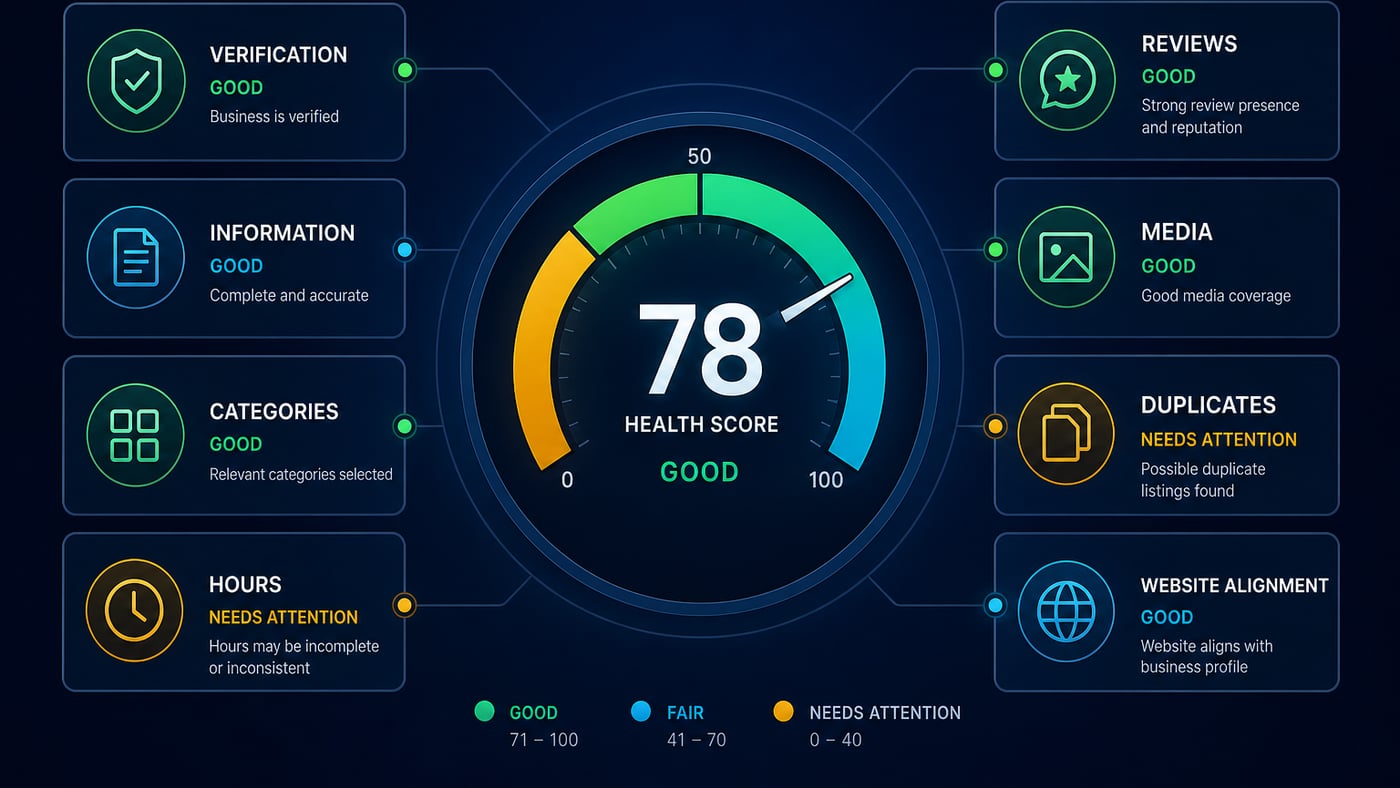
A score is useful only when its weighting is transparent. Ownership loss, an incorrect phone number, a closed-hours error, or a policy violation should matter more than a missing optional photo. Separate findings into critical, high, medium, and low priority, and show the evidence behind each deduction. Compare a location with its own previous baseline rather than assuming every category needs the same configuration.
- <strong>90–100:</strong> strong fundamentals; verify recent changes and address minor opportunities.
- <strong>75–89:</strong> generally healthy; resolve several meaningful accuracy or completeness gaps.
- <strong>50–74:</strong> material weaknesses; prioritize customer-facing errors and trust issues.
- <strong>Below 50:</strong> urgent review; investigate control, eligibility, severe inconsistency, or policy exposure.
These ranges are an operating framework, not a Google metric. A 96 does not guarantee top-three rankings, and a 70 does not prove a profile is penalized. Track whether completed fixes improve accuracy, customer actions, qualified leads, and sustainable visibility.
Criteria for Choosing a GMB Health Checker Tool
Choose a tool that explains checks in plain language, timestamps data, links findings to evidence, supports multiple locations, and exports prioritized tasks. Look for role-based access, change history, configurable alerts, privacy controls, and clear handling of connected account data. It should separate public-data checks from checks that require authorized GBP access.
Ask how scores are weighted, how often rules are updated, what requires manual confirmation, and whether false positives can be dismissed with notes. Useful integrations should support the workflow, not hide it. Review the full feature set and pricing options against location count, team responsibilities, and audit frequency.
Set Up Recurring Monitoring
A one-time audit becomes stale as soon as hours change, a new review arrives, a manager edits a field, or Google accepts a public suggestion. Monitor critical identity and access fields daily or through alerts, review customer-facing content weekly, and run a deeper audit monthly. Seasonal businesses should schedule checks before every hours, service, or inventory transition.
Maintain an approved baseline, change log, named owner, and response deadline for each severity level. Record intentional edits before publishing them so alerts can distinguish planned work from suspicious activity. Review trends across locations, but preserve local context; the same finding can have different consequences for a hospital, restaurant, contractor, or retail chain.
A Practical 30-Day GBP Health Plan
- <strong>Days 1–3:</strong> confirm ownership, verification, eligible location setup, account security, and recovery details.
- <strong>Days 4–7:</strong> correct name, address, phone, hours, categories, links, and high-impact public errors.
- <strong>Days 8–14:</strong> complete relevant attributes, services, products, descriptions, and landing-page alignment.
- <strong>Days 15–21:</strong> assess reviews, responses, photos, posts, Q&A, duplicates, and unauthorized changes.
- <strong>Days 22–26:</strong> resolve policy risks, document exceptions, assign remaining tasks, and verify fixes publicly.
- <strong>Days 27–30:</strong> establish the baseline score, configure monitoring, schedule monthly audits, and report outcomes.
Do not change every field simultaneously unless customer harm or policy risk requires it. Staged updates make verification easier and preserve a cleaner record of what influenced calls, direction requests, bookings, website visits, and local visibility.
Final Takeaway
Consistency compounds, spam collapses.